
Answered
Photoshop CC 2020 has no Crop Tool in Tools?
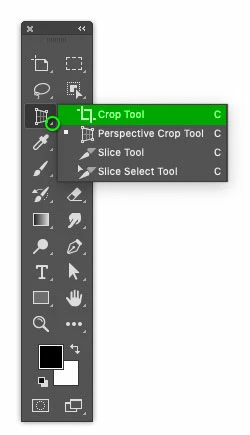
If you have not customized the Tools panel, the Crop tool may be hiding in its tool group. This may have happened if the Perspective Crop tool was recently used and brought to the front of the group. Click and hold the mouse button on the tool group to open it and see all the tools in the group, then click the Crop tool to bring it to the front again.
Already have an account? Login
Enter your E-mail address. We'll send you an e-mail with instructions to reset your password.
 AdChoices