Participating Frequently
May 26, 2016
Resuelto

PhotoShop CC and film grain filter

  • May 26, 2016
  • 6 respuestas
  • 27763 visualizaciones

Hello!

I can't seem to find the film grain filter in Photoshop CC, is it still available?

Thanks!

    Este tema ha sido cerrado para respuestas.
    Mejor respuesta de SteveWeinrebe

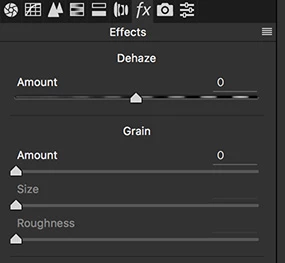
    Go Filter > Camera Raw Filter..., and click on the "fx" tab. You'll find a terrific film grain filter there.

    If you make your layer(s) a Smart Object first (Filter > Convert for Smart Filters), you can apply the Camera Raw Filter non-destructively.

    Steve
    6 respuestas

    SteveWeinrebeRespuesta
    Inspiring
    May 26, 2016

    Go Filter > Camera Raw Filter..., and click on the "fx" tab. You'll find a terrific film grain filter there.

    If you make your layer(s) a Smart Object first (Filter > Convert for Smart Filters), you can apply the Camera Raw Filter non-destructively.

    Steve

    Trevor.Dennis
    Community Expert
    Community Expert
    May 27, 2016

    For such a simple thing, this is one of my absolute favourite features in recent versions of Photoshop.  Camera RAW > fx > Grain, is the best tool of its kind I have ever come across, and it adds a very convincing 'digital noise' to solid brushed colour.  It makes hand painted fixes, or additions to a photograph, look real and convincing.  It even works well with retouched skin tones. 

    Filter > Filter Gallery > Texture > Texturizer is useful, and you can save your own textures as PSD files and load them to use with that filter, but its more of an embossed effect, and serves a completely different purpose.

    didiermazier
    Community Expert
    Community Expert
    May 26, 2016

    NIK filters are now free by Google. You can find all types of grains of old films (ilford etc)… Google Nik Collection

    But good ole Grain is in the artistic folder…

    Norman Sanders
    Legend
    May 26, 2016

    Are you working with 8 bit files?

    c.pfaffenbichler
    Community Expert
    Community Expert
    May 26, 2016

    But even with 16bit or CMYK Files Filter Gallery should only be grayed out, not completely missing.

    Norman Sanders
    Legend
    May 26, 2016

    Right you are, CP. Sorry.

    Norman Sanders
    Legend
    May 26, 2016

    Oops! I meant to write Film Grain in #4

    Norman Sanders
    Legend
    May 26, 2016

    Are you looking for Filter > Filter Gallery > Artistic > Fine Grain?

    TNLuz15Autor
    Participating Frequently
    May 26, 2016

    Yes but Filter gallery no longer exists in Photoshop CC?

    c.pfaffenbichler
    Community Expert
    Community Expert
    May 26, 2016
    Yes but Filter gallery no longer exists in Photoshop CC?

    Could you please post a screenshot to illustrate the issue?

    Is the image RGB?

    What is your Photoshop > Preferences > Plug-Ins > Show all Filter Gallery groups ands names-setting?

    What are the Edit > Menus settings?

    c.pfaffenbichler
    Community Expert
    Community Expert
    May 26, 2016

    Which Filter are you talking about exactly?

    Do you mean a 3rd party Filter like the ones in Nik Collection? (edited)

    TNLuz15Autor
    Participating Frequently
    May 26, 2016

    In earlier versions of Photoshop, there was a filter where you could apply and adjust film grain, it was internal, it came with Photoshop.

    c.pfaffenbichler
    Community Expert
    Community Expert
    May 26, 2016

    I can’t recall it (unless you mean something other like Add Noise for example).

    Under which grouping was it listed as far as you can remember?