
Participant
March 4, 2018
Answered

Photoshop CC - Brush > Color Replacement Tool is missing

  • March 4, 2018
  • 2 replies
  • 2946 views

Hello!

After 10 years i am working in Photoshop again...and i have a small problem. I missing "Color replacement tool".
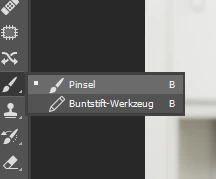
where can I find a brush to change colors? Could you help me please?

    This topic has been closed for replies.
    Correct answer davescm

    Hi

    Try going to Edit > Toolbar and in the dialogue that opens click "Restore Defaults"

    Dave

    2 replies

    Inspiring
    April 5, 2020

    Thank you, I'm doing an online training and PS 2020 is different than the instructors PS interface so I'm wasting all this time looking for things that aren't there!  This helped!

    davescm
    Community Expert
    davescmCommunity ExpertCorrect answer
    Community Expert
    March 4, 2018

    Hi

    Try going to Edit > Toolbar and in the dialogue that opens click "Restore Defaults"

    Dave