
Participating Frequently
January 11, 2018
Question

Photoshop CC Hard Round Brush is basically a razor wire fence...

  • January 11, 2018
  • 2 replies
  • 1733 views

Hey all

I recently got new parts fitted in my PC (an SSD & a GTX1070) and I've encountered a few issues since then, first of all my tablet didn't even work but that's all sorted now, so I booted up photoshop as I wanted to do some doodling and -something- has happened.

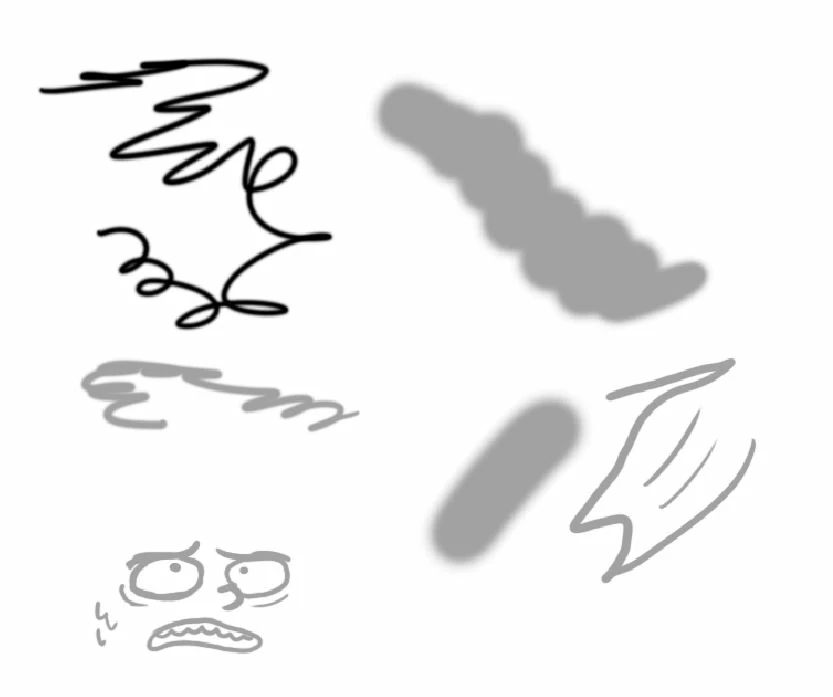
Below is my brush strokes now, my hardness alternating throughout each one but you can see that the brush stroke is basically on a grid no matter what zoom I'm on apart from 100%.
Below is how my doodles used to look, there's no patchy bits on curves and it's generally better in my opinion.
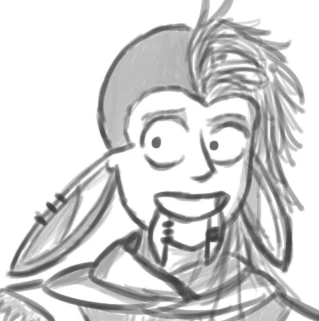
The image above was zoomed in by the time I captured the image (being captured before I exchanged parts,) my Tablet is plugged into my CPU as it always had been but somethings happened, any help would be appreciated!

This topic has been closed for replies.

2 replies

BobsyAuthor
Participating Frequently
January 14, 2018

Any update to this would be gladly welcomed as I do tend to do work on this tablet & photoshop, not just for leisurely activities.

davescm
Community Expert
Community Expert
January 11, 2018

Hi

That looks like a GPU drawing issue, so a couple of questions:

1.When you installed the new GPU card did you also go to NVidia and get the latest drivers? (Don't rely on Windows find the latest).

2. Did the new GPU replace an older card or do you have it fitted alongside an older GPU?

If you are not sure - go to Help >System Info and click on the copy button. Then paste the info here

Dave

Trevor.Dennis
Community Expert
Community Expert
January 11, 2018

Also check Preferences > Performance > Cache levels If it is set to 1, then change it to any other value (4 is good). You could also try different Drawing Mode settings.  i.e. if it is set to Advanced, change it to basic, but Advanced is usually best, because some features _might_ not work with it set to basic (Perspective Warp)