

Photoshop CC has huge cursors on High-DPI screen
Hi,
I've recently got hold of Photoshop CC, and I've found something that's rather annoying. I have 4KUHD screens, but I tend to prefer applications with the High-DPI mode turned off (I like smaller buttons and more space to work with - that's why I got these monitors in the first place). Of course, my first action in Photoshop CC was to disable High-DPI mode, but it seems that this doesn't affect the cursors. Below is an image showing first how the cursors actually appear, and second how I would expect them to appear.
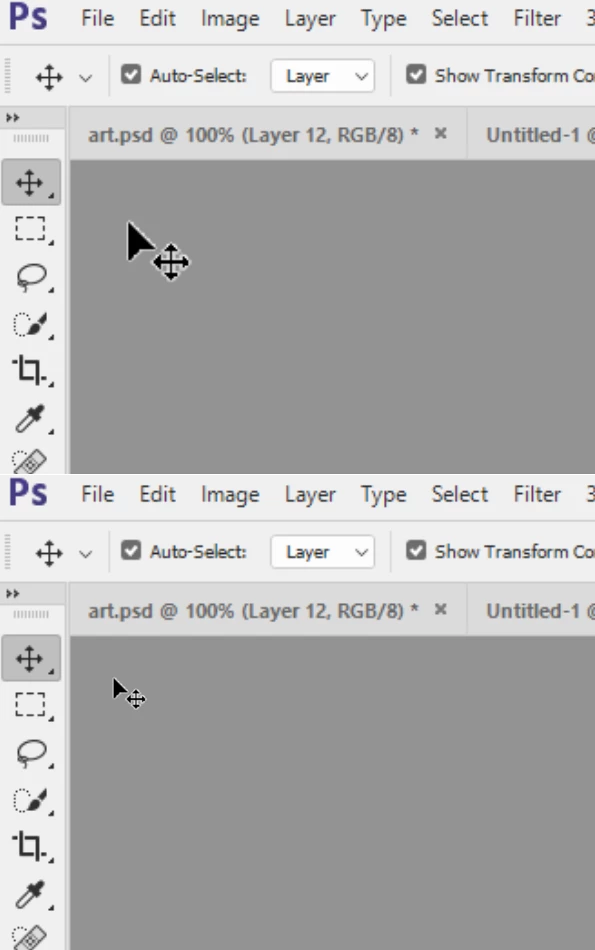
I have tried using the "precision" cursors, but all this does it change the image associated with the cursors, not the size. I have also tried disabling High-DPI scaling at the OS level, which also does not help. Is there a way to resize these cursors to properly reflect my monitor resolution?
Thanks,
 AdChoices