
aaqib7
Participant
March 19, 2020
Question

Photoshop CC Javascript - How to add Color Overlay Smart Object

  • March 19, 2020
  • 2 replies
  • 3360 views

Hi,

How do I add a Color Overlay to a Smart Object using Javascript (Photoshop 2020).


As you can see below I can achieve this is Photoshop 2020 by right clicking the Smart Layer (named "Test") and by choosing Color Overlay --> Picking a color via Color Picker.
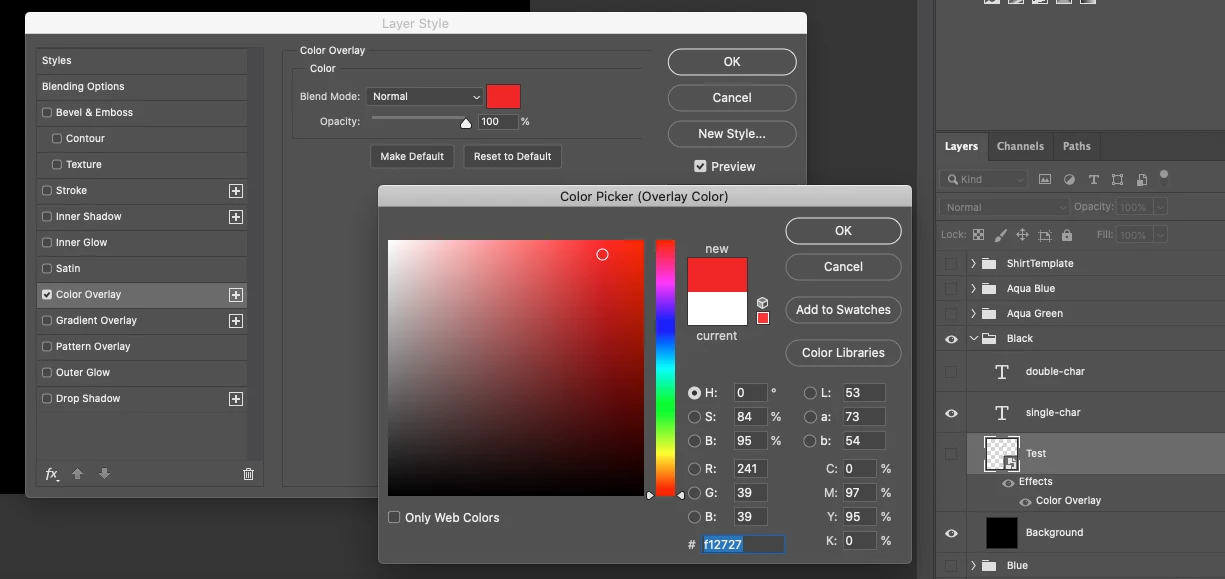


How can this be achieved using Javascript as I need to script this since I'm generating many images at once. Using the javascript reference below I'm unable to find a method or call that enables me to do this on a smart object or even a layer. Is this even possible?


https://www.adobe.com/content/dam/acom/en/devnet/photoshop/pdfs/photoshop-cc-javascript-ref-2019.pdf


Thank you

Aaqib

This topic has been closed for replies.

2 replies

Stephen Marsh
Community Expert
Community Expert
March 19, 2020

Hi aaqib7


I am just a beginner, so I hope that I don't get this wrong or confuse things... JavaScript Reference "DOM" code only covers so much. For almost everything else, Photoshop scripters rely on using the "Scripting Listener plugin" to record "Action Manager" (AM) code. Sometimes this raw code is cleaned up using a script called "Clean SL". Some advanced scripters write/use "Action Descriptor" code if I understand things correctly, or make major revisions to the AM code recorded by Scripting Listener. It is all the same code (ExtendScript), but I like to think of it as being "different" as it looks so different!


That being said, I could not get the raw AM code from Scripting Listener, nor the refined code run through Clean SL to work to add the color overlay layer style effect to the smart object layer.


So, as a fallback I used the "xtools" script from xbytor to convert a recorded Action from the actions panel in script code, which forms the second part of the active code below:


#target photoshop

/* Convert Layer to Smart Object - Script Listener Code
var idnewPlacedLayer = stringIDToTypeID( "newPlacedLayer" );
executeAction( idnewPlacedLayer, undefined, DialogModes.NO );
*/

// Convert Layer to Smart Object
app.runMenuItem(stringIDToTypeID('newPlacedLayer'));

// xtools action to javascript from xbytor - add color overlay effect/style
cTID = function (s) {
  return app.charIDToTypeID(s);
};
sTID = function (s) {
  return app.stringIDToTypeID(s);
};

function colorBlend() {
  function step1(enabled, withDialog) {
    if (enabled != undefined && !enabled)
      return;
    var dialogMode = (withDialog ? DialogModes.ALL : DialogModes.NO);
    var desc1 = new ActionDescriptor();
    var ref1 = new ActionReference();
    ref1.putProperty(cTID('Prpr'), cTID('Lefx'));
    ref1.putEnumerated(cTID('Lyr '), cTID('Ordn'), cTID('Trgt'));
    desc1.putReference(cTID('null'), ref1);
    var desc2 = new ActionDescriptor();
    desc2.putUnitDouble(cTID('Scl '), cTID('#Prc'), 100);
    var desc3 = new ActionDescriptor();
    desc3.putBoolean(cTID('enab'), true);
    desc3.putBoolean(sTID("present"), true);
    desc3.putBoolean(sTID("showInDialog"), true);
    desc3.putEnumerated(cTID('Md  '), cTID('BlnM'), cTID('Nrml'));
    var desc4 = new ActionDescriptor();
    desc4.putDouble(cTID('Rd  '), 241); // Red value
    desc4.putDouble(cTID('Grn '), 39); // Green value
    desc4.putDouble(cTID('Bl  '), 39); // Blue value
    desc3.putObject(cTID('Clr '), sTID("RGBColor"), desc4);
    desc3.putUnitDouble(cTID('Opct'), cTID('#Prc'), 100);
    desc2.putObject(cTID('SoFi'), cTID('SoFi'), desc3);
    desc1.putObject(cTID('T   '), cTID('Lefx'), desc2);
    executeAction(cTID('setd'), desc1, dialogMode);
  };

  step1();
};

colorBlend.main = function () {
  colorBlend();
};

colorBlend.main();


greless
Inspiring
March 19, 2020


  try {
        var d = new ActionDescriptor();
        var r = new ActionReference();
        r.putProperty(stringIDToTypeID("property"), stringIDToTypeID("layerEffects"));
        r.putEnumerated(stringIDToTypeID("layer"), stringIDToTypeID("ordinal"), stringIDToTypeID("targetEnum"));
        d.putReference(stringIDToTypeID("null"), r);
        var d1 = new ActionDescriptor();
        var d2 = new ActionDescriptor();
        var d3 = new ActionDescriptor();
        d3.putDouble(stringIDToTypeID("red"), 241);
        d3.putDouble(stringIDToTypeID("green"), 39);
        d3.putDouble(stringIDToTypeID("blue"), 39);
        d2.putObject(stringIDToTypeID("color"), stringIDToTypeID("RGBColor"), d3);  
        d1.putObject(stringIDToTypeID("solidFill"), stringIDToTypeID("solidFill"), d2);
        d.putObject(stringIDToTypeID("to"), stringIDToTypeID("layerEffects"), d1);
        executeAction(stringIDToTypeID("set"), d, DialogModes.NO);
        }
    catch (e) { }


You can use the ScriptingListener plug-in