
Participating Frequently
October 25, 2018
Answered

Photoshop CC Pen tool in Mac VS PC

  • October 25, 2018
  • 1 reply
  • 324 views

Hi,

Working in Photoshop CC in Mac: I made paths with the pen tool and every path created a new layer. Then selecting the layer would let me add color to the path in the menu. When I went to teach my students on PC computers, pen tool paths did not create new layers. Then I tried to color the path to add color and would not let me add color. Is it about settings or is Mac Photoshop different from PC? I feel lost using the pen tool in PC, help please.
    This topic has been closed for replies.
    Correct answer JJMack

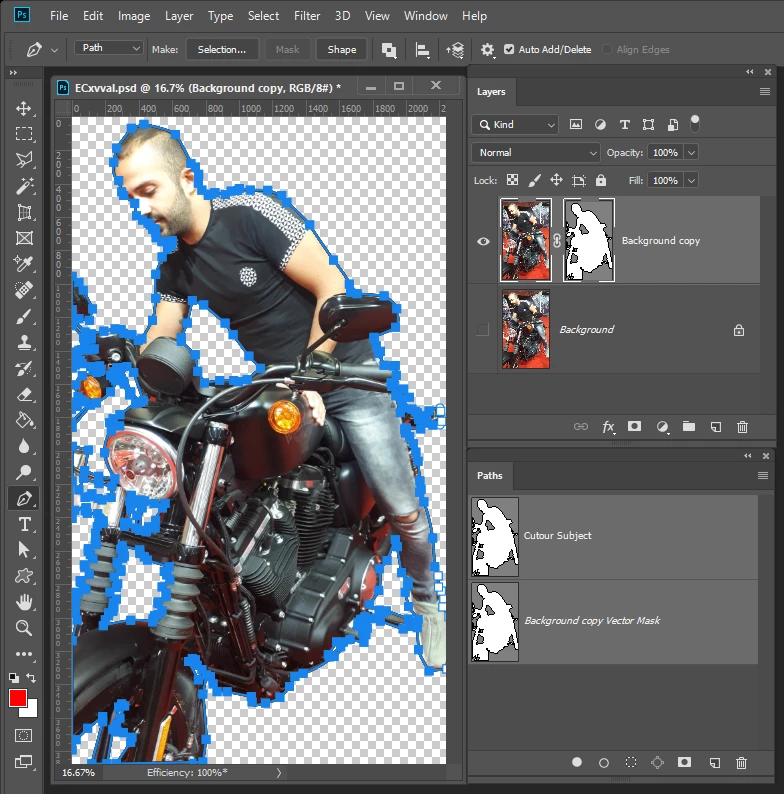
    Are you sure you were creating Paths on the Mac not Shapes.  Path does not create layers.  Just create a work path in the Path Palette.

    I do not use a mac so I do not know if you have a problem on yours or made some change to a setting to change how Path creation works.  I would think that Path would work the same on both Platforms. Path can be very complex and have many open and closed segments.  Closed segments can have different types of operation like other types of selection.  Add, Subtract, intersect  Path has and additional operation exclude.

    There may be a Modifier Key like selection tool Shift Adds Alt Subtracts.   Even Shape layers work like that.  Drag a shape drag out a second holds the shift or alt key they will combine into a single shape layer

    1 reply

    JJMack
    Community Expert
    JJMackCommunity ExpertCorrect answer
    Community Expert
    October 25, 2018

    Are you sure you were creating Paths on the Mac not Shapes.  Path does not create layers.  Just create a work path in the Path Palette.

    I do not use a mac so I do not know if you have a problem on yours or made some change to a setting to change how Path creation works.  I would think that Path would work the same on both Platforms. Path can be very complex and have many open and closed segments.  Closed segments can have different types of operation like other types of selection.  Add, Subtract, intersect  Path has and additional operation exclude.

    There may be a Modifier Key like selection tool Shift Adds Alt Subtracts.   Even Shape layers work like that.  Drag a shape drag out a second holds the shift or alt key they will combine into a single shape layer

    JJMack