
Charismatic_yogiB82A
Known Participant
November 13, 2016
Question

Photoshop cc2017: image shifted on second monitor

  • November 13, 2016
  • 5 replies
  • 1517 views

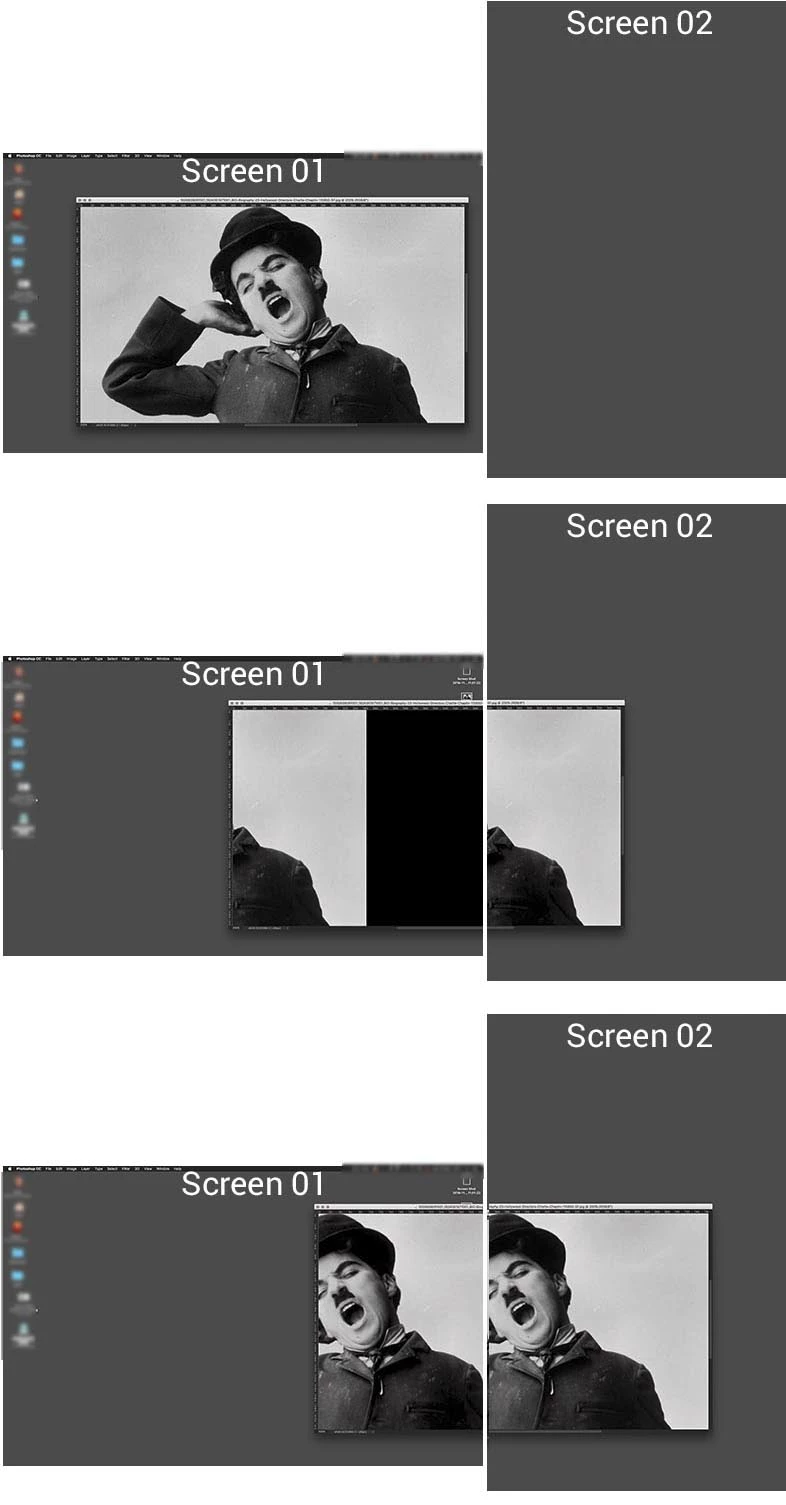
since the CC 2017 update, when i move an image even only slightly to my second monitor it gets shifted. see example images below. it shows only the part of the images wich is on the second monitor, the rest is black. if i move the image deeper in the second monitor, it shows tow equal parts of the images on both monitors. i still have the previous version of photoshop installed an made a test there. this is definitely not happening there. please advise or remove the bug. otherwise the second monitor is not working properly. many thanks!
This topic has been closed for replies.

5 replies

Participant
April 26, 2017

Same thing happening to me. It is like the second pair of images posted. If the image gets dragged even slightly onto the second monitor, the image jumps to the left in its box, leaving a sliver of image and the rest black.

iMac (Retina 5K, 27-inch, Late 2014)

4GHz intel Core i7

32 GB ram

Running OS X Yosemite 10.10.5

JJMack
Community Expert
Community Expert
April 26, 2017
Participant
April 26, 2017

This was the only thread that I found that was very similar to the issue I am having. If you know of any others with more helpful info, please link me up!

Participant
February 19, 2017

I'm having the same issue. Also have the older version still installed and it doesn't happen with that version only CC2017

davidh94430577
Participant
December 12, 2016

I have a similar problem since the 2017 update.

I have a 27"i-mac late 2015 running Sierra 10.12.1

My primary screen shows big black and grey patches and when dragged to the secondary screen all is good.

After a few times of dragging back and forth it starts to behave on the primary screen. This is quite time consuming and annoying as the retina screen is much more preferable to work on in Photoshop. This is not happening in any other program.

I hope someone can come up with an answer

Dave

Participating Frequently
November 22, 2016

Same Problem here on two different Macs:

Mac Pro (Late 2013)

64GB ram

Dual AMD FirePro D500 3072 MB

MacOS 10.11.6

Photoshop CC 2017.0.0

and on a

Mac Pro (Early 2009)

NVIDIA GeForce GTX 680 2048 MB

MacOS 10.10.5

Photoshop CC 2017.0.0

Thanks!

JJMack
Community Expert
Community Expert
November 13, 2016

It would be helpful it you provide pertinent information like OS version Display Adapter and Display Adapter driver version.

JJMack
Charismatic_yogiB82A
Known Participant
November 13, 2016

yes of course, i'm sorry.

here the system information:

Mac Pro (Late 2013)

64GB ram

Dual AMD FirePro D500 3072 MB

MacOS 10.11.6

Photoshop CC 2017.0.0