
June 16, 2018
Question

Photoshop clipboard error

  • June 16, 2018
  • 3 replies
  • 2057 views

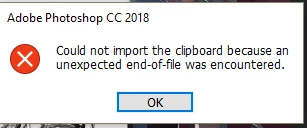
I've been using photoshop for a few weeks and recently when I tried using copy and paste via clipboard I run into an error. I've looked on other forums but the solutions didn't seem to work.
My computer:
OS: WIndows 10
Ram: 8GB
GPU: Zotac 1050ti
This topic has been closed for replies.

3 replies

Participant
November 14, 2020

how can i solve the problem,i am also face this problem


jbm007
Community Expert
Community Expert
June 17, 2018

It is not a widespread problem, and always seems to be tracked down to external (third party) software affecting Photoshop.

and ..............or try this

Open Notepad, Word or some other word processor type software, type in some text (doesn't matter what - you're not going to save it), select it and press CTRL+C to copy the text to the clipboard. This will clear the clipboard of whatever may be blocking it up and often solve the problem.

June 17, 2018

I've tried this and it doesn't seem to resolve the issue. I've been using the snipping tool that is default in windows 10 and the prtScn button but when I do press it, the error pops up ins PS.

Trevor.Dennis
Community Expert
Community Expert
June 16, 2018

Was this a one off, or is it happening every time?

Have you tried pasting from the clipboard into other applications?  Windows Paint would do, and prove whether the clipboard is working OK.

What is your workflow when copying to the clipboard?  Is this from a selection inside Photoshop, for instance?  If so, are you definitely copying from a raster (image) layer, rather than a vector or adjustment layer?

The more information you supply, the better people will be able to help.

June 17, 2018

No this is happening every time when I use the Windows clipping tool or the prtscn button. I usually screenshot an image from chrome browser and put it on my clipboard, then I usually go to PS to paste it as a reference, the problem is that the error message pops up; even if I make a new file the error persists.