Participant
March 1, 2023
Answered

Photoshop closed

  • March 1, 2023
  • 2 replies
  • 2029 views

hello, adobe photoshop and after effect programs are closing by itself. When I open 2,3 different filen in photoshop, it closes it by itself and so does the after effect. The files are only png etc. I get the same error though with low size file. It's a very adequate system in my system, I wonder how I will solve this. I tried most of the videos on youtube but it didn't work.

This topic has been closed for replies.
Correct answer Sameer K

I couldn't find any crash reports with your account logged into the Community. I'll help you figure this out.

Please submit a crash report if you see a crash reporter pop-up: https://helpx.adobe.com/photoshop/kb/submit-crash-reports.html


Open Event Viewer from Windows Search.

  • Go to Windows Logs > Application Logs & look for Error & Warning logs.
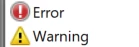
     

  • Share the log related to the Lightroom Classic crash instance with us.
  •  

As a basic step, ensure no stale preferences in your Photoshop. Go to the location of the preference folder below and rename it to backup. https://helpx.adobe.com/photoshop/using/preferences.html

  • Windows 10/11: Users/[user name]/AppData/Roaming/Adobe/Adobe Photoshop [version]/Adobe Photoshop [version] Settings
  • Press Windows + R & type this is the Run Window - %APPDATA%\Adobe
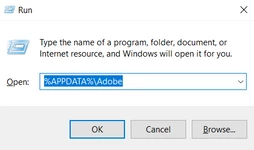
     

  • Rename the Adobe Photoshop folder by adding a .old at the end. (Adobe Photoshop 2023 > Rename > Adobe Photoshop 2023. old)


These changes will give a fresh start to Photoshop as a fresh install. Let me know how it goes.

Thanks!

Sameer K

 

2 replies

Sameer K
Community Manager
Sameer KCommunity ManagerCorrect answer
Community Manager
March 1, 2023

I couldn't find any crash reports with your account logged into the Community. I'll help you figure this out.

Please submit a crash report if you see a crash reporter pop-up: https://helpx.adobe.com/photoshop/kb/submit-crash-reports.html


Open Event Viewer from Windows Search.

  • Go to Windows Logs > Application Logs & look for Error & Warning logs.


  • Share the log related to the Lightroom Classic crash instance with us.
  •  

As a basic step, ensure no stale preferences in your Photoshop. Go to the location of the preference folder below and rename it to backup. https://helpx.adobe.com/photoshop/using/preferences.html

  • Windows 10/11: Users/[user name]/AppData/Roaming/Adobe/Adobe Photoshop [version]/Adobe Photoshop [version] Settings
  • Press Windows + R & type this is the Run Window - %APPDATA%\Adobe


  • Rename the Adobe Photoshop folder by adding a .old at the end. (Adobe Photoshop 2023 > Rename > Adobe Photoshop 2023. old)


These changes will give a fresh start to Photoshop as a fresh install. Let me know how it goes.

Thanks!

Sameer K


Participant
March 1, 2023

hello, after going to the folder you described, there were 2 different photoshop files, but someone deleted it in 2021 and I opened the application again, this time I encountered a different error related to the video card. Windows was rolling back the video card update, after I fixed it, I did the installation again and now I can use it without any error. thanks

Kevin Stohlmeyer
Community Expert
Community Expert
March 1, 2023

Hi @Adem28255257oxc7 how much free HD space do you have in Photoshop Preferences/Scratch Disk?

Participant
March 1, 2023

700gb in sdd, 1000gb in hdd

Kevin Stohlmeyer
Community Expert
Community Expert
March 1, 2023

Thanks @Adem28255257oxc7 wow 1TB free space? Thats awesome.

Can you go to Photoshop Help Menu/System Info and copy/paste details here - that will give us a better understanding of what could be going on.