
Participant
March 2, 2021
Answered

Photoshop Cloud Associates folder

  • March 2, 2021
  • 1 reply
  • 9294 views

I recently downloaded Adobe Photoshop (through Adobe Creative Cloud). Every time that I open the application, it creates an "Adobe" folder in my "Documents" folder. Within that "Adobe" folder is another folder titled "Photoshop Cloud Associates". I do not want this folder here. How do I delete it and permanently rewrite the pathway?
Correct answer Conrad_C

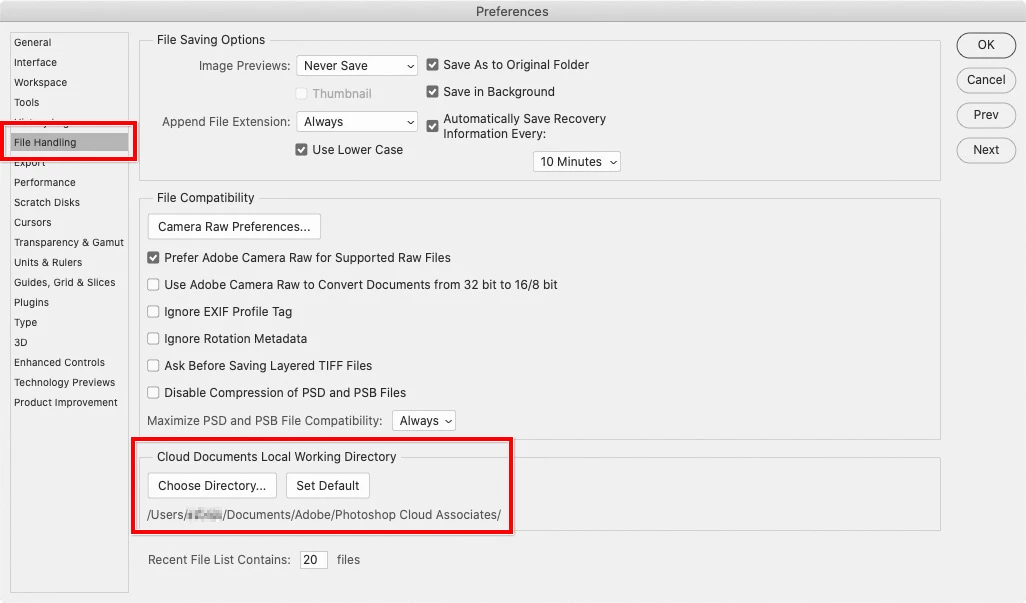
Go into Preferences, and in the File Handling panel, change the Cloud Documents Local Working Directory.


1 reply

Conrad_C
Community Expert
Conrad_CCommunity ExpertCorrect answer
Community Expert
March 3, 2021

Go into Preferences, and in the File Handling panel, change the Cloud Documents Local Working Directory.


ALEC5E6EAuthor
Participant
March 3, 2021

Thank you very much! That fixed it.