February 9, 2021
Question

Photoshop Color Space Keeps Shifting

  • February 9, 2021
  • 2 replies
  • 480 views

I am going berzerk trying to get the color to stay put. My MacBook Pro is running Big Sur. Things seem fine if I work on the Apple screen, however, I prefer to work on my larger Dell. I have the Dell calibrated and things seem to work fine in browsers if I move them from monitor to monitor. However, within Photoshop, things keep shifting on me. 


In Photoshop, I have my Color Settings set to use the calibrated profile. When I open the file, I either convert to working RGB or leave as is. Either way, things work the same.  


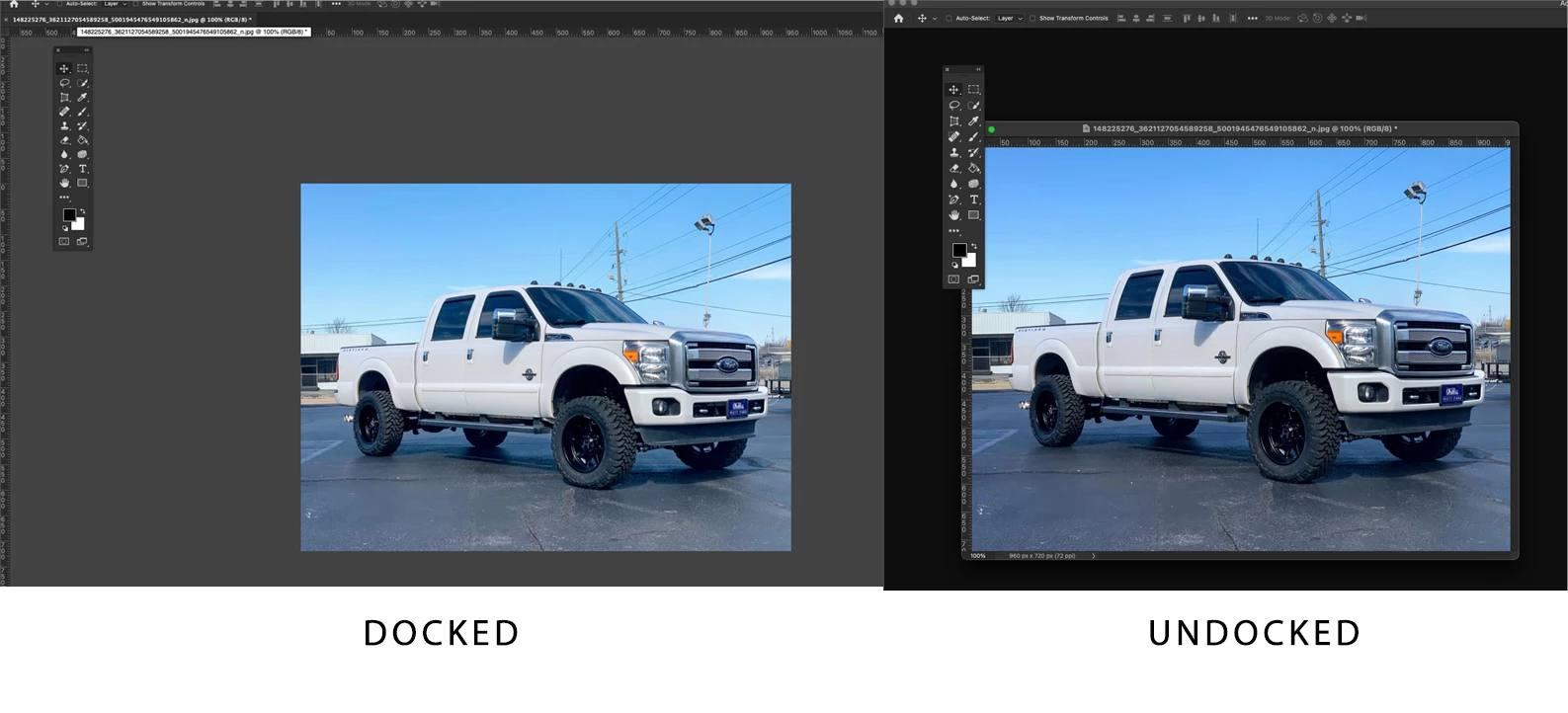
The photo opens up docked. It looks like the gamma is off. I think that's the right term.  If I undock it, it looks more correct. The sky is a deeper blue and the tires are not over-lightened. If I re-dock it, it stays that way.  

What the heck is going on here?
This topic has been closed for replies.

2 replies

davescm
Community Expert
Community Expert
February 9, 2021

 I had typed a reply - but had not spotted the obvious as pointed out by Dag. I'll add it if the issue still occurs when corrected.

Dave

D Fosse
Community Expert
Community Expert
February 9, 2021

😉


Yeah, me too. But we need to get this sorted first. Then we'll see how it turns out.

D Fosse
Community Expert
Community Expert
February 9, 2021

You're making a few basic errors that we need to sort first:


"In Photoshop, I have my Color Settings set to use the calibrated profile."


I don't know who told you to do that, but it's wrong and it breaks color management completely. The profile made by your calibrator is set up at system level (the calibrator does this automatically). It has no business in the document or in Photoshop's color settings.


In short, run the calibration software and then don't do anything.


The document profile is completely separate from the monitor profile. Don't mix them up! You need both, each in the correct place.


The document profile should always be a standard profile: sRGB, Adobe RGB, ProPhoto or DCI-P3. It should always be embedded in the file. Don't convert to working RGB, leave color settings at "preserve embedded profiles".


Revert all your Photoshop color settings to defaults. You do this by clicking the North America General Purpose preset. If you later get to the point where you need to change something, you will also know why you need to change it.

February 9, 2021

THANK YOU so much.  OK, so I reverted it to North America General Purpose 2. I didn't see one without the 2 and assume you meant this one.


The problem still remains, though.  It's kind of faded and meh when I open it. I drag it free of dock and it looks better and more like what I see in the browser where I downloaded it from. I re-dock it and it stays good.


Also worth noting, when I click on it while docked and begin dragging, it momentarily lightens up and then corrects when I let go. It does NOT do this when I click and drag back to docked.


February 9, 2021

OK I have either solved this or I'm burned out from trying. I did a factory reset on the monitor and now it seems to be ok - I think.  I'll be back if not haha. Thanks, y'all.