
hidalgo5EA9
Known Participant
October 26, 2020
Question

photoshop colors different from lightroom

  • October 26, 2020
  • 17 replies
  • 4109 views

Hello,

i have just update photoshop to the latest version and for some reasons now, when i click on edit in photoshop from lightroom, the colors are completely different, with the previous version of photoshop i had a 100% color match without doing anything.
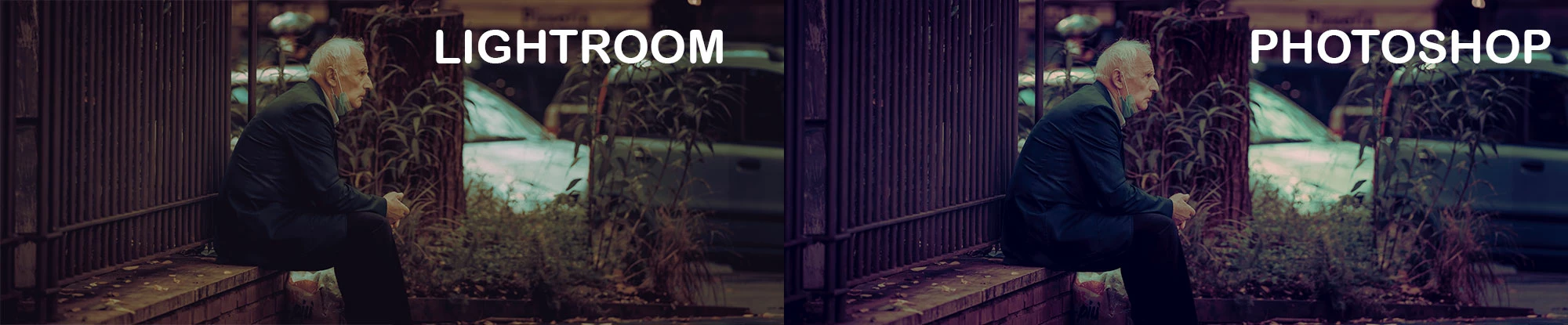
do i have to set any color management profile or similar? and if yes where?

This topic has been closed for replies.

17 replies

Participant
October 30, 2020

I'm having this exact same issue since upgrading to the latest versions of LR and PS. Very annoying.

D Fosse
Community Expert
Community Expert
October 30, 2020

...and the answer is very likely the same as above (or the many other threads about the same issue in the last week). In almost all these cases, it's a defective monitor profile. It seems a new batch of bad profiles has just been pushed through Windows Update.


Replace the monitor profile as per my screenshot above. If that doesn't do anything, come back with screenshots (Lr/PS side by side).


Actually you picked the most complicated thread of all these, because the original poster refuses to accept the answer, and hasn't come back since. That tends to increase the noise level and general confusion.

hidalgo5EA9
Known Participant
October 31, 2020

lol i am making it complicated? i think that is Adobe that is making things complicated.

And to answer you once again NO! its not a defective monitor profile, i am not using adobe products since yesterday.


What your are saying is that till i was using my previous version of Photoshop the profile was correct and with the new version it got corrupted?, because i have several other tools in the same machine and colors come out perfectly fine on any other software except for photoshop, so you still think is a malfunctioning driver/profile?


if that' would be the case, doing what i have suggested before shouldn't make any difference at all, instead it works, because once i simply export the first photo in dng, i can then keep editing in photoshop all my other photos in raw format and they open just fine, how this behaviour sound anything like a bug in photoshop to me is a mystery.


NB, colourmanagement
Community Expert
Community Expert
October 28, 2020

Please go ahead and try what D. Fosse has suggested - replacing the display profile, its important to rule that out


I hope this helps

thanks
neil barstow, colourmanagement.net :: adobe forum volunteer
[please do not use the reply button on a message within the thread, only use the blue reply button at the top of the page, this maintains the original thread title and chronological order of posts]

D Fosse
Community Expert
Community Expert
October 27, 2020

This looks like a defective monitor profile. If you're not using a calibrator, monitor/laptop manufacturers distribute their own generic profiles through Windows Update, and these profiles are very often bad in several ways. This will often affect applications differently.


Look at the histograms from these screenshots. The severe channel clipping seen in the PS example (which accounts for the purple cast) is very typical of a broken monitor profile:


As a first troubleshooting step, replace your current profile with sRGB IEC61966-2.1. It won't be entirely accurate, but if the difference disappears, then that confirms the profile is bad. Then you should get a calibrator to make a new profile.


If that doesn't help, it could be a buggy video driver. Disable GPU in both Photoshop and Lightroom preferences, and compare again.


A more remote possibility - and only if you have two displays - is that one of them is using the wrong profile. But try the above first.

hidalgo5EA9
Known Participant
October 27, 2020

Hello,


Well the issue is not in a defective driver, as explain in my original post, as long as i had the previous version of photoshop the colors were 100% the same of lightroom.

Now i have tried few experiments and disabling the gpu acceleration as fixed the issue for a little, but not turning it on or off doesn't seems to make absolutely zero difference, i believe the issue relies on the photoshop update somehow, but i can't fix it defenetely.

hidalgo5EA9
Known Participant
October 27, 2020

I have managed to isolate the problem and its 100% photoshop.

just tried by exporting one single image from lightroom, import that one in photoshop then from there procede with the usual edit in photoshop from lightroom and boom! all the pictures have the correct colors.


If instead i directly do the edit in photoshop thing from lightroom the colors mismatch.

NB, colourmanagement
Community Expert
Community Expert
October 27, 2020

Could it be this: when opening RAW camera images in each application, the characteristics of the camera are taken into account [it’s a kind of camera profile]. That means that Photoshop and Lightroom both need to be latest versions - because the RAW processor [with its camera compensation profiles] sometimes gets updated.

If you make a tiff in lightroom and save that then open it in Photoshop are you seeing the same issue?


I hope this helps

thanks
neil barstow, colourmanagement.net :: adobe forum volunteer
[please do not use the reply button on a message within the thread, only use the blue reply button at the top of the page, this maintains the original thread title and chronological order of posts]

Stephanieweberphotography
Participant
October 27, 2020

I was coming on here to ask the same question. Have been on hold trying to get through to someone because this has also messed with my worklfow. 

Participant
October 26, 2020

I am having the same exact issue right now. None of the color grading/edits from Lightroom is being replicated over to Photoshop 2021 if selecting "edit in photoshop 20201" since upgrading both Lightroom Classic and Photoshop. This is very frusterating and has distrubted my workflow.

hidalgo5EA9
Known Participant
October 26, 2020

I Forgot to mention that i have set now photoshop to ask for missmatch color profiles and when i import i select "keep original color profile" so there is no change in the initial lightroom profile.