sierrar37618953
Participant
December 29, 2020
Question

Photoshop Corrupt File
  • December 29, 2020
  • 2 replies
  • 221 views

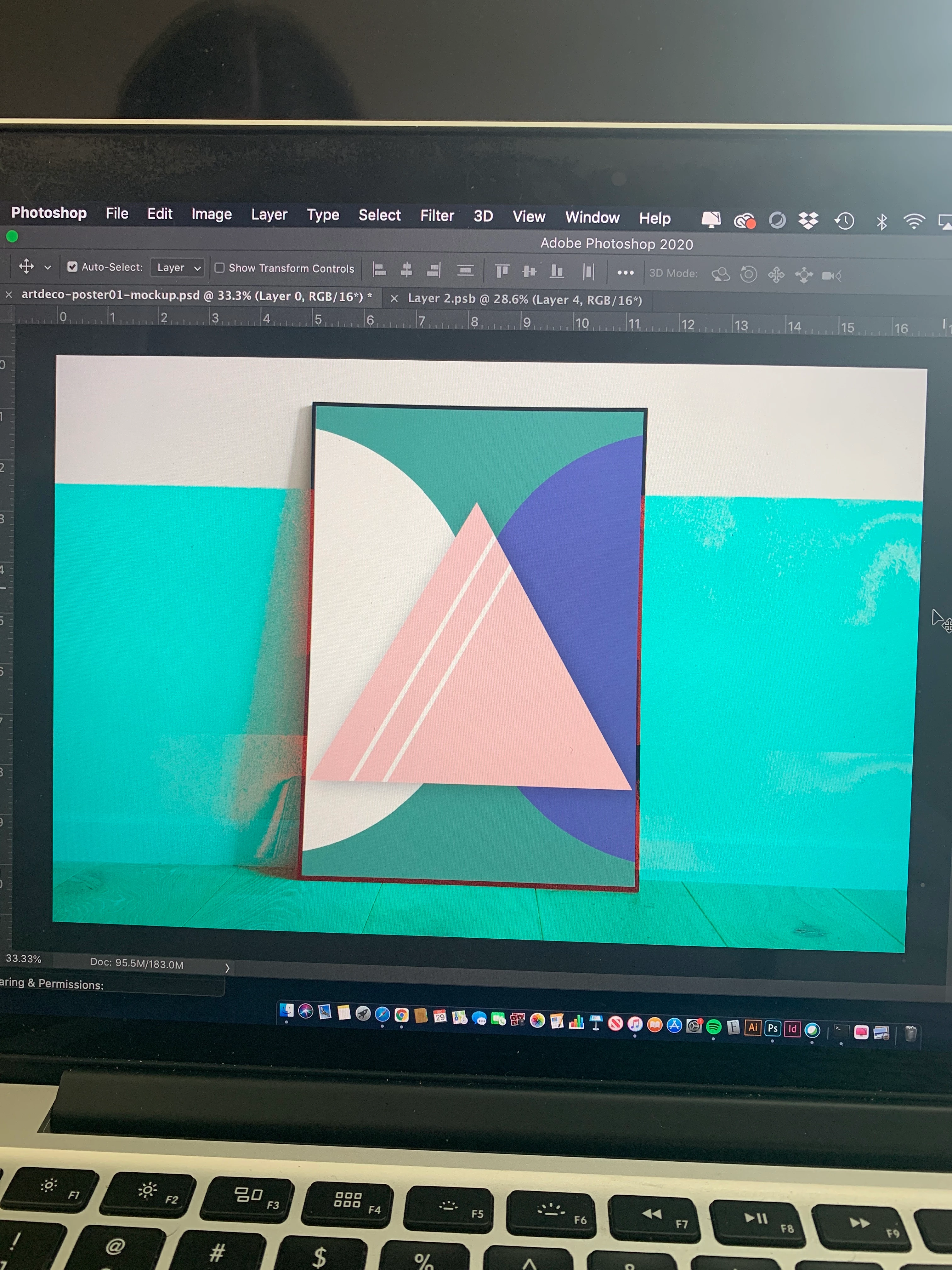
Recently reopened this file and it looks like this now. The background was white with a hardwood floor and contains a smart object for the poster frame area. Does anyone know how to fix it or do I need to redo it?

This topic has been closed for replies.

2 replies

D Fosse
Community Expert
Community Expert
December 29, 2020

File corruption is almost always caused by failing hardware. It can be a disk about to fail or bad RAM, but if you're working off external disks that would be the prime suspect. Check all cables and connectors thoroughly.


If you're working directly over a network, don't. Networks are notoriously unstable. Work locally, then copy over.


Power loss during a save can also corrupt files.


There is one more remote possibility: a buggy video driver. Yes, GPUs do a lot of data processing these days, and a bad driver can corrupt. But that means the file was actually saved in a corrupt state and you would have seen it.

mglush
Community Expert
Community Expert
December 29, 2020

Hi! It's hard to tell what we are looking at. Can you give us a little more information? What versionof Photoshop are you using? Are you on a Mac or Windows machine? What did the file look like before?

Let us know so we can help you more effectively,

Thanks,

Michelle

sierrar37618953
Participant
December 29, 2020

Hello,

I'm using a MacBook Pro year 2014, I'm using photoshop 21.0.2 release. The image I posted is what you see when you open the file. I tried to save a new jpg to see if it was just in photoshop but it also causes the jpg to have the blue background. Not sure what happened to this because I haven't opened the file in a few weeks now.