RYKERadb
Participant
September 26, 2022
Question

Photoshop Crashes/Freezes Entire PC After ~10 minutes [Windows 11]

  • September 26, 2022
  • 3 replies
  • 670 views

I am having very similar problems to this post which never reached a solution from what I can tell.

After actively (won't crash if I don't touch it) using Photoshop for just a few minutes, my main screen will go dark, and my 2nd monitor freezes about 10 seconds thereafter. The problem started in roughly the past week or so seemingly out of nowhere. Perhaps an auto-update spelled my doom, I am not sure.

Here are some random bits of information which may prove useful in troubleshooting:
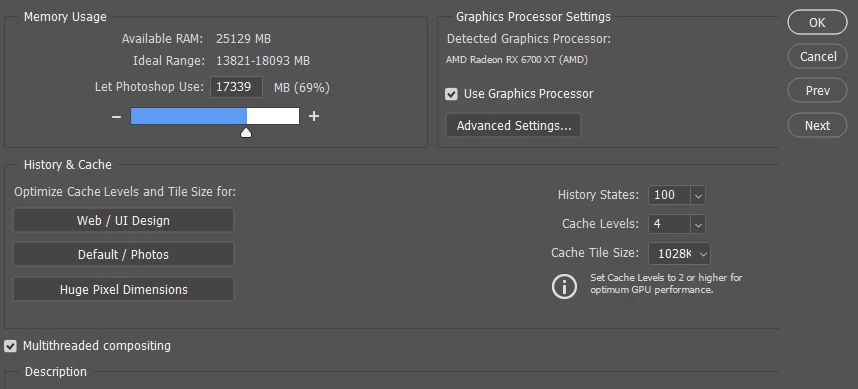
- I am using Windows 11 with the latest build, and I'm on Photoshop 23.5.1 (latest version).
- My main monitor is an ultrawide
- I have uninstalled all but 3 plugins (Brandfetch, Glitch. Pexels) in my attempts to troubleshoot.

PC Specs
Ryzen 7 5800X
32GB RAM
RX 6700 XT on latest drivers

Any help is greatly appreciated, thanks.

This topic has been closed for replies.

3 replies

RYKERadb
RYKERadbAuthor
Participant
September 29, 2022

This is almsot too hilarious. I noticed when my PC booted back up from crashing, my mouse wouldn't be recognized by my PC. I swapped out my mouse for another one, and the crashing completely stopped. I guess HyperX hates Photoshop??

TheDigitalDog
Inspiring
September 26, 2022

When Photoshop crashes, this is the first thing to do, try resetting your Photoshop preferences. Press and hold Alt+Control+Shift (Windows) or Option+Command+Shift (Mac OS) immediately after launching Photoshop. You will be prompted to delete the current settings. You can also reset preferences upon a quit if Photoshop is running by going into General Preferences>General>Reset on Quit.

If that doesn't fix the issue:
Go to Preferences > Performance... and uncheck Multithreaded Compositing - and restart Photoshop.
Still crashing? 
Go to Preferences > Performance... click Advanced Settings... and uncheck "GPU Compositing" - then restart Photoshop. Still crashing?  

Author “Color Management for Photographers" & "Photoshop CC Color Management/pluralsight"
RYKERadb
RYKERadbAuthor
Participant
September 26, 2022

Also worth noting: it's not temperature related. This system has been stress tested with every component 100% under load for hours to make sure of that. It's ONLY Photoshop which causes this problem.