Participant
November 6, 2020
Question

Photoshop cropping image and not printing to fill page

  • November 6, 2020
  • 3 replies
  • 1638 views

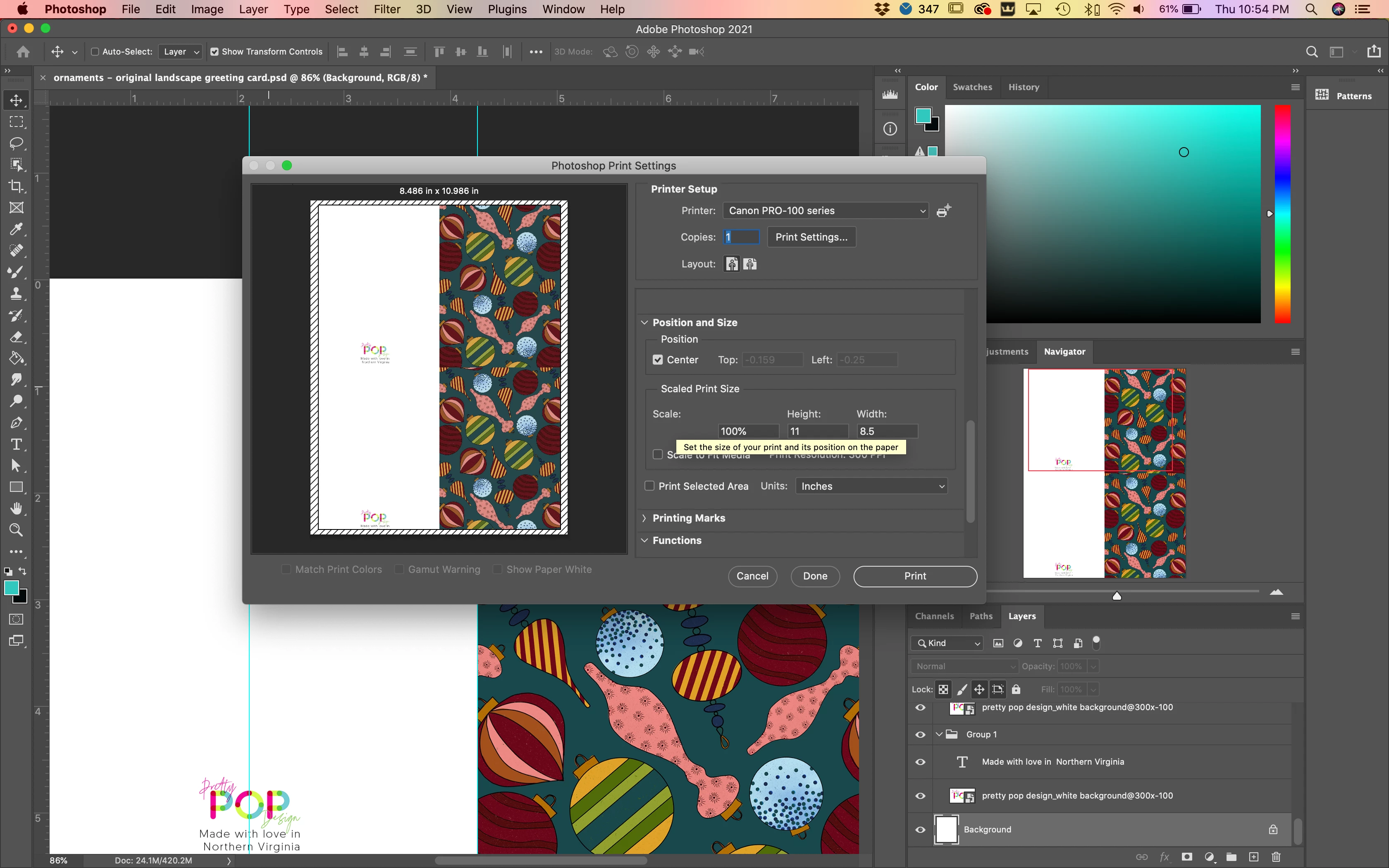
Hello.  I'm trying to print a 8.5 x 11 image.  When I open the print dialogue, Photoshop is cropping my image to 8.486 x 10.986.  Why won't it print to fill the entire page?  Please help!
This topic has been closed for replies.

3 replies

Participant
April 10, 2023

I had this problem too, and realized that, even though I had 8.5x11" paper selected in, I needed to open the print settings and  select 8.5x1" borderless.

Mike_Gondek10189183
Community Expert
Community Expert
November 6, 2020

I could not replicate, but then I have a different printer. Do you have another printer to choose, or can you update the printer driver, incase this is coming from the printer driver.

Is that a borderless printer, try changing those settings.

https://support.usa.canon.com/kb/index?page=content&id=ART164385

JJMack
Community Expert
Community Expert
November 6, 2020

Can the printer print boarderless on 8.5x11" paper, and did you set all the printer setting correctly for a boarderlessprint. It looks like the print preview is showing some unprintable area on the paper be hash black lines border that is being displayed.

JJMack