Inspiring
March 4, 2018
Répondu

Photoshop CS6 Actions

I have loaded some actions which work fine, but when i try to use button mode is does not display properly, only a few action are colour coded, but most are not.  What am I doing wrong?

    Ce sujet a été fermé aux réponses.
    Meilleure réponse par Barb Binder

    Hi Patricia:

    You can change the colors after they are created:
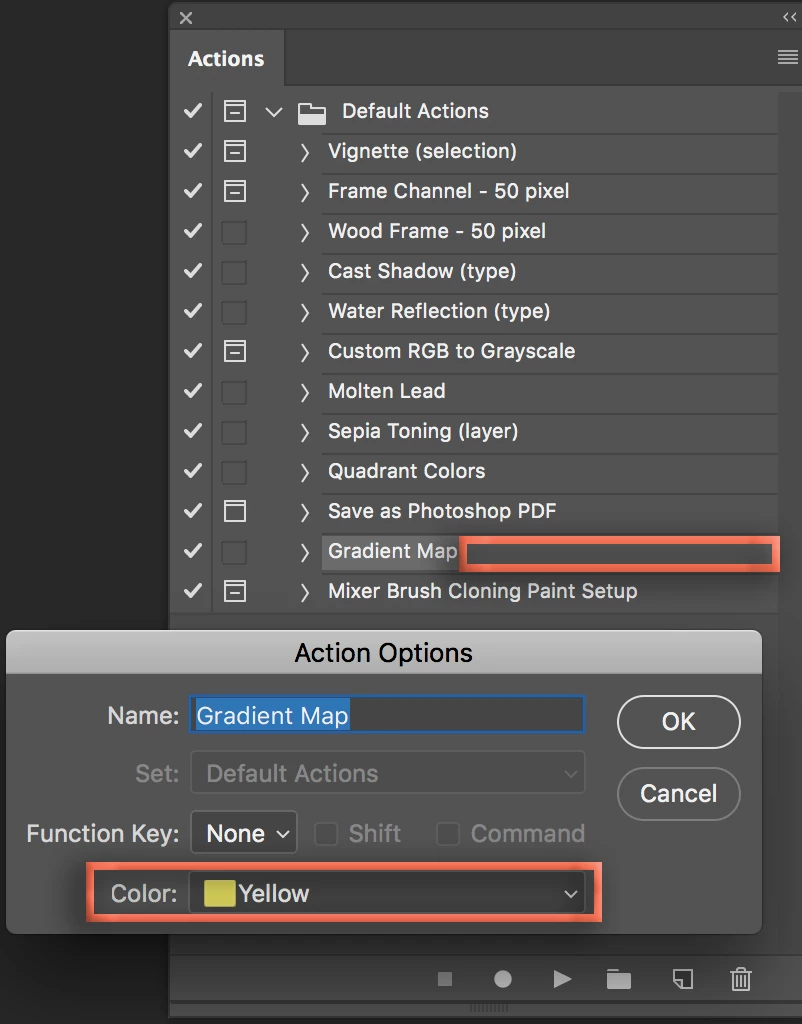
    1. Switch out of Button Mode.
    2. Double click to the right of the name of the action you want to work on (outlined in orange to edit the Gradient Map button)
    3. Pick your color, click OK
    4. Return to Button mode to see the color.

    ~Barb

    2 commentaires

    melissapiccone
    Community Expert
    Community Expert
    March 5, 2018

    You aren't doing anything wrong - the colors are added when the action is created, so the ones with no color were not created with a color.

    Melissa Piccone | Adobe Trainer | Online Courses Author | Fine Artist
    Inspiring
    March 5, 2018

    is it possible to colour code them now?

    Thanks for the reply

    melissapiccone
    Community Expert
    Community Expert
    March 5, 2018

    I don't know... I searched for a way but didn't find anything.

    Melissa Piccone | Adobe Trainer | Online Courses Author | Fine Artist
    Nancy OShea
    Community Expert
    Community Expert
    March 4, 2018

    Where did you find these actions?  And are they compatible with legacy CS6?

    Nancy O'Shea— Product User & Community Expert
    Inspiring
    March 5, 2018

    Bought them from The Luxe Lens and yes they are compatible with CS6. Thank you for replying