Participant
July 13, 2012
Answered

Photoshop CS6 PSD losing layers

  • July 13, 2012
  • 4 replies
  • 19032 views

Hi, my Photoshop CS6 PSDs are getting flattened if opened by any previous versions of Photoshop, depsite not being saved just opened.  When I open the original in CS6 again, all layers are merged.  Where there were 12 layers, there is now one.  This is causing loads of problems.  Please advise.
This topic has been closed for replies.
Correct answer Noel Carboni

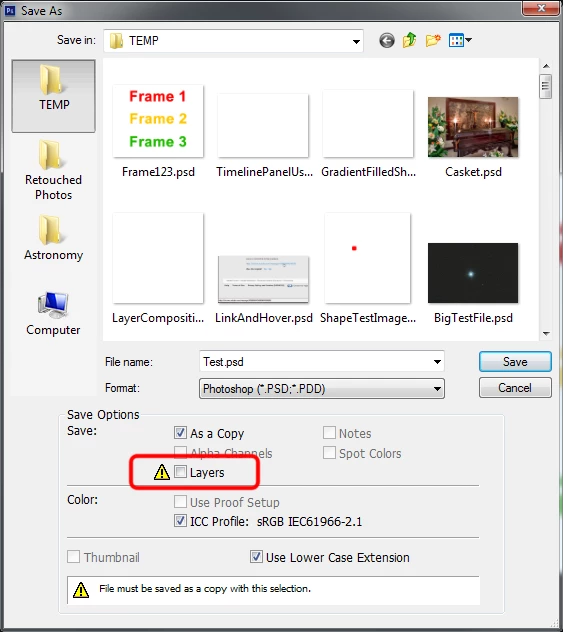
Yes, thank you, Conroy.  Now I think of it that was the true basis behind my post above.  It wasn't that the Save As PDF operation had flattened the image, it was that it had turned off the option Conroy showed for subsequent operations.

You can reproduce it like this:

1.  Open a layered document.

2.  Save As - PDF, disable Preserve Editing Capabilities.

3.  Save As - PSD, note that the above mentioned checkbox is now OFF.

This is a nasty gotcha, and while the little caution symbol is there it's not that noticeable.  Maybe Adobe should draw the red border around it as we have done.

-Noel

4 replies

Participant
March 19, 2014

This is unbelievably shocking...

I have just lost 7 hrs work working on a document. As I have always done is previous versions of Photoshop, I produce the work as a PSD, then in order for the client to review it I do a 'Save As' and save it as a PDF.

I've always been able to continue working on and resave as a PSD at this point and keep the layers. Why has this been changed in CS6 so it automatically flattens the document even though the layers are there in your workspace pallete?

I'm flabbergasted........and very unhappy. 7hrs down the swanny!!

Participant
December 15, 2014

I have just encountered the same problem.  I would have never known that if I save it as a PDF then save it as a PSD that it would flatten  my PSD file.  Now I also have to redo my project and then make sure to save it correctly :/

station_two
Inspiring
December 15, 2014

Well, opening a PDF in Photoshop immediately rasterizes it (and flattens it) when you open it.

I don't see how you can save an image as a PDF and expect it to behave as a PDF or TIFF.

"Funny" formats (for lack of a better, more dignified collective designation) such as JPEG, PDF, and EPS copies, are optimally generated from your saved, PSD master file at the very end of your workflow.

conroy
Participating Frequently
July 13, 2012

Are you sure that you are saving the layers.

Noel Carboni
Noel CarboniCorrect answer
Legend
July 13, 2012

Yes, thank you, Conroy.  Now I think of it that was the true basis behind my post above.  It wasn't that the Save As PDF operation had flattened the image, it was that it had turned off the option Conroy showed for subsequent operations.

You can reproduce it like this:

1.  Open a layered document.

2.  Save As - PDF, disable Preserve Editing Capabilities.

3.  Save As - PSD, note that the above mentioned checkbox is now OFF.

This is a nasty gotcha, and while the little caution symbol is there it's not that noticeable.  Maybe Adobe should draw the red border around it as we have done.

-Noel

Participant
July 13, 2012

Thanks guy.  I spoke to the colleague using Photoshop and she confirmed that she created a PDF prior to saving the PSD.

Noel Carboni
Legend
July 13, 2012

You are storing something in your PSD files using Photoshop CS6 that's not compatible with the older version of Photoshop, and the older version is reverting to opening the flattened composite (such composite is stored in the file when you choose the Maximize Compatibility of PSD and PSB Files option in preferences).

If you want to use older versions of Photoshop on your PSD files created with the newer version and maintain all the features, of course you'll have to limit what you do using the newer version to features that are fully supported in the older version as well.

If you're unsure of what it is that's not compatibile with the older version, put up a screen grab of your Layers panel, or better yet post a small PSD file somewhere and I'm sure someone here will be able to look at it and make some suggestions.

-Noel

Participant
July 13, 2012

Hi Noel,

The problem is that when I open the file again in CS6 all the layers have been lost, everything is now on one flattened layer, despite the fact that the file has not been saved by the earlier version of Photoshop.

Nick

Noel Carboni
Legend
July 13, 2012

If the file has not been saved by the user, are you seeing the file on disk being changed?  I find it hard to believe that without Photoshop saving the file it's being changed somehow.  I've never seen Photoshop write to a file without being commanded to do so.

Is this reproducible?  If so, please provide a PSD file with which it can be reproduced.  I'm sure the Adobe engineers would be incredibly interested in seeing it.

-Noel

Inspiring
July 13, 2012

Moving the discussion to the Photoshop Forums