
Participant
June 13, 2012
Answered

Photoshop CS6 rotates text 90 degrees to the right istead of aligning characters vertically?

  • June 13, 2012
  • 4 replies
  • 26677 views

I'm having this issue.

Type some text and try to change orientation to vertical and the program rotates 90 degrees to the right instead of aligning text.

I did a reset of Photoshop settings file (CTRL + SHIFT + ALT on Photoshop boot) and no change of issue.

Video of issue included.

Windows XP SP3

Photoshop CS6 Extended

Asking here prior to filling a bug request.

Thanks for any help you community might give me.
This topic has been closed for replies.
Correct answer Jeff Arola

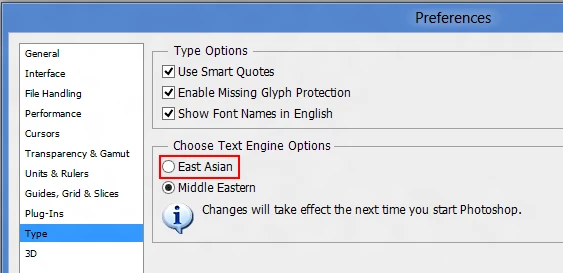
Do you have the Text Engine Options set to Middle Eastern under Edit>Preferences>Type?

If you do try changing to East Asian and restart photoshop.

4 replies

May 13, 2017

Does anyone else have a different fix for this? I have the same exact problem except none of these solutions are working for me. I'm really, extremely frustrated and upset. Thanks.

Jeff Arola
Community Expert
Community Expert
May 13, 2017

What version of photoshop and operating system are you using?

May 14, 2017

Cs6 , sorry ! Thanks for responding ! I dont know what's going on but it only writes vertically in new projects , not the one I need it to ! Any idea why ? I've switched the settings as directed above ... maybe I just need to redo it    Really confused.

selenka222
Participant
December 22, 2014

You guys are awesome!! Had the same problem for whatever reason (probably changed the settings myself ages ago and forgot) and now I was frustrated for hours trying to make the verticlal tool work correctly Googled a lot and this board, as always, came to the rescue!

Respect!

Jeff Arola
Community Expert
Community Expert
June 13, 2012

As Noel points out Reset Character should clear things up, but the reason is you probably don't have

Standard Vertical Roman Alignment checked.

Participant
June 13, 2012

Did what Noel and you gave me.

Good ones, but didn't change the program behavior issue.

Jeff Arola
Community Expert
Jeff ArolaCommunity ExpertCorrect answer
Community Expert
June 13, 2012

Do you have the Text Engine Options set to Middle Eastern under Edit>Preferences>Type?

If you do try changing to East Asian and restart photoshop.

Noel Carboni
Legend
June 13, 2012

When I do just what you did, I get the expected result:

Did you try resetting things?

-Noel