October 30, 2012
Answered

Photoshop CS6 save for web some colors change?

  • October 30, 2012
  • 1 reply
  • 18757 views

I have a picture with large area of color: #fffdfd, when I save it for web (jpg) this color is changed to #fefcfd (in JPG).

I just can not save as JPG with #fffdfd.

(was trying uncheck convert to sRGB, do not embed color profile - always #fffdfd changes to #fefcfd when save for web)

However, color #fefcfd when save for web , does not change.

Why some colors change and some not? Is it a bug ?

Window7 64bit, Photoshop CS6

This topic has been closed for replies.
Correct answer sudarshan.t

okay, you are right, it is not sampling correct here CS6, Mac 10.7
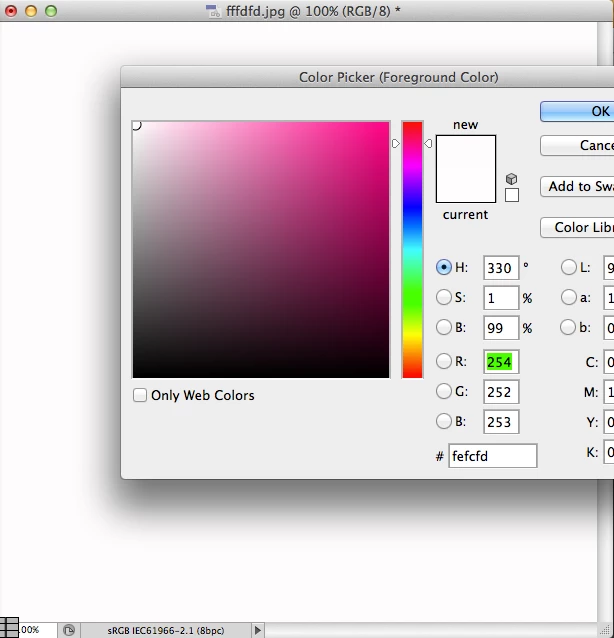

Save for Web & Devices will strip some color data from the file.

Browsers aren't color managed. Most file formats on browsers assume they're sRGB. While Photoshop gives you an option of embedding sRGB to the document color space, it also strips off data that is not relevant. This is a common occurence.

PNG-24 on the other hand will give you the exact color match.

Also, Save for W&D, JPG quality matters a lot - The same color at Quality 10,20,30,40,50...100 wil give you different color reproductions on the JPG end output.

If you're concerned that much about an offset of +/- 1 hex value to your RGB colorspace, dont save for web & devices. Do a 'Save As' instead. Then use an image editing/ resizing application such as ResizeMe to resize the quality of your document. This, in most cases will retain colorspace information but just drop the resolution and quality of the image - giving you a lesser filesize.

On a sidenote, You may also want to read this article on how to best manage color spaces: http://viget.com/inspire/the-mysterious-save-for-web-color-shift

1 reply

Inspiring
October 30, 2012

short answer is Edit> Convert to Profile: sRGB before you set the Hex color

Save for Web: I like to leave the Adobe SFW default behavior (Convert to sRGB and don't embed ICC profile), especially if you need to "match" a Hex in CSS HTML...

http://forums.adobe.com/message/4740901

October 30, 2012

I tried what you said but no success. Source PSD background color is #fffdfd, after save for web (in JPG) always changes. I open JPG in Photoshop and the color in JPG is #fefcfd. (both files sRGB).

Could s/o reproduce this case: create document, backgroud color #fffdfd, save for web, open this jpg, check the color pls.?

I read several forums discussions about shifting colors in save for web, but any of their solutions does not work for me.

To mach the CSS background I can change  CSS color to #fefcfd, but I would like JPG keeps the same color hex as PSD.

Inspiring
October 30, 2012

if the SFW .jpg is untagged (you set the Hex while in the sRGB colorspace and stripped the profile as i said) when you open the .jpg in Photoshop you first need to Edit> Assign Profile: sRGB -- it should then sample the correct Hex

is that not happening