
Participant
November 10, 2016
Answered

Photoshop CS6 woes revisited

  • November 10, 2016
  • 1 reply
  • 345 views

I reinstalled CS6 to overcome a fail at start up error.

The new installation failed similarly. Starting CS6 while holding

down the Ctrl/Shift/Alt keys gave me an option to start the app

in Administration mode. That effectively eliminated the errors

but now every time I start it it asks "Do you want this application

to make changes to your computer?" I only use it to access my

scanner and it's only an annoyance, no longer a failure

but if there is an easy fix I'd like to know.
    This topic has been closed for replies.
    Correct answer tomb202

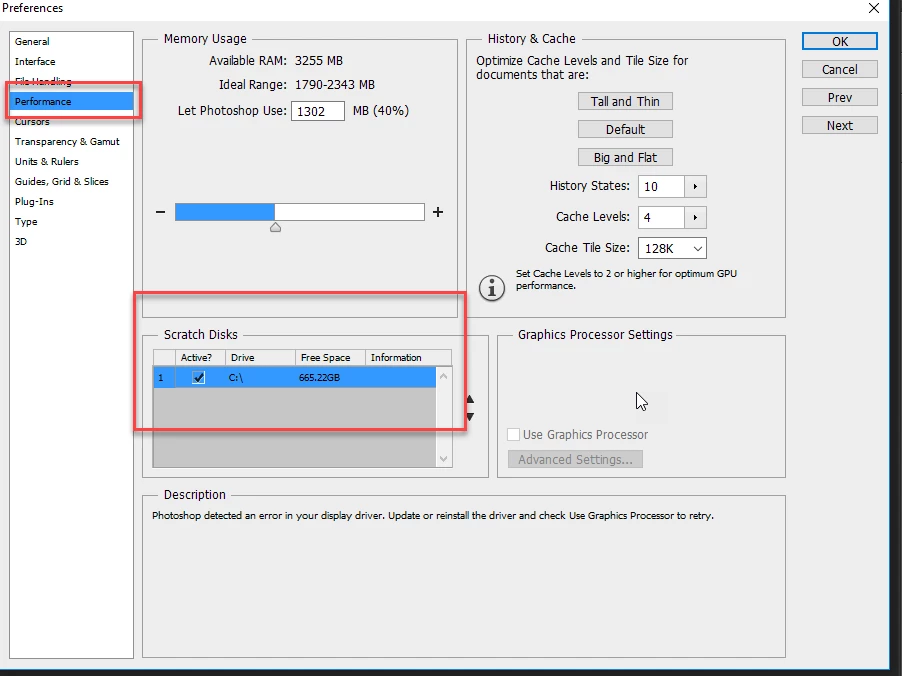
    Perhaps change the locatetion of Scratch Disk or even deactivate it.  See this picture:


    I didn't see any way to deactivate it altogether but I changed it

    from C:\ to a scratch drive and turned off Run as Administrator.

    It seems to be working as expected now. I can scan again.

    1 reply

    Sahil.Chawla
    Adobe Employee
    Adobe Employee
    November 10, 2016

    Hi Tomb,

    Please right click on the Photoshop Icon and choose Properties, then go to the Compatibility tab on the top & uncheck Run this program as an administrator and click OK.

    Try launching the application after this and please let us know about the outcome.

    Regards,

    Sahil

    tomb202Author
    Participant
    November 10, 2016

    When I uncheck the "Run as Administrator" line the

    application fails on start up with two errors

    1 - Could not open a scratch file because the file is locked...

    2 - Could not initialize Photoshop because the file is locked...

    It was to bypass these error screens that I set "Run as Administrator".

    mytaxsite
    Inspiring
    November 10, 2016

    Perhaps change the locatetion of Scratch Disk or even deactivate it.  See this picture: