
Participant
June 7, 2024
Question

Photoshop: Daily crash and high level of RAM

  • June 7, 2024
  • 1 reply
  • 173 views

Hi,

My photoshop crash every hours.

I found that, when I open a files in photoshop the level of the RAM up and it never down.

Here is a picture of what's happening.
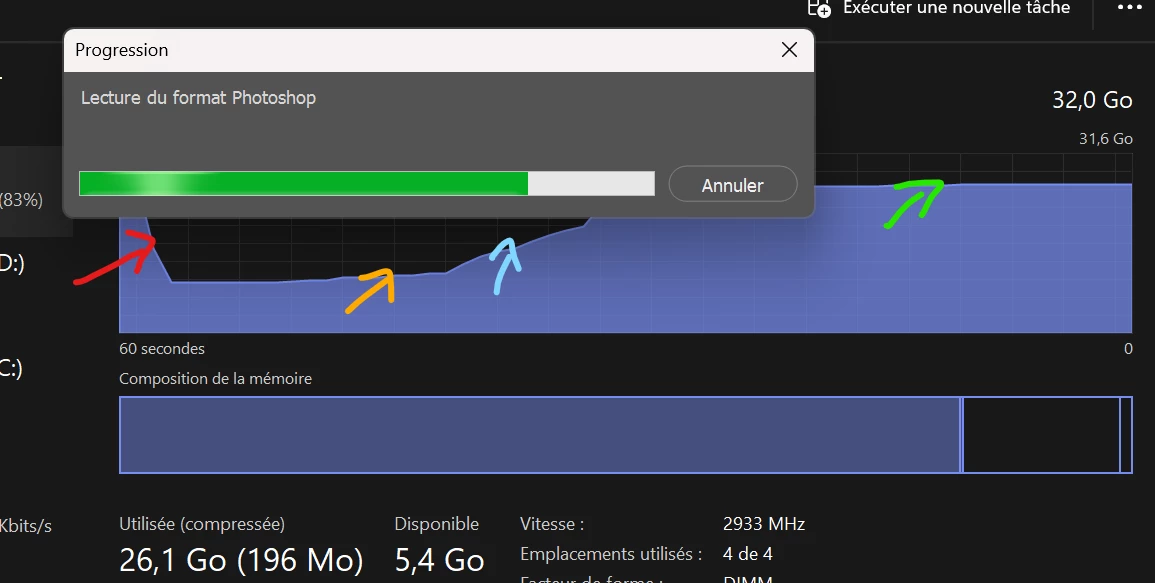
The red arrow show when I close the app

The yellow arrow show when I open the app

The blue arrow show when I open a files in the app

The green arrow show that the RAM don't get down.


To solved this issue:

I restart my computer

Try with an older version of photoshop

Uninstall and install photoshop

Update my graphic driver

Try to solve the problem by reducing the performance.


Hope you could help me to solve that issue.

This topic has been closed for replies.

1 reply

D Fosse
Community Expert
Community Expert
June 7, 2024

It's not supposed to go down. The memory is reused and recycled, but not released until you quit Photoshop. This is done for speed reasons. Batch processing would be unworkable if Photoshop had to request memory from the operating system for every file.


This is why you set a limit to memory allocation in Photoshop preferences. It will be filled quickly and remain there. But don't set it too high - you need to leave some so that you don't choke the rest of the system. With 32 GB installed, 70 % is a sensible number.


Memory is there to be used. Free memory is wasted memory. Raster image editing requires huge amounts of memory, much more than any RAM you may have installed. So the bulk of it is handled by the scratch disk. Think of RAM as a cache to the scratch disk's main memory. It makes sense to fill it to the limit quickly.