


milekpiatek
Participant
December 4, 2020
Question

Photoshop do not start, scratch disk problem

  • December 4, 2020
  • 2 replies
  • 554 views

After latest update Photoshop do not start.

What i tried: install previous version, unninstal all, delete all from app data/roaming/, then reinstal fresh one. No effect. Messages:
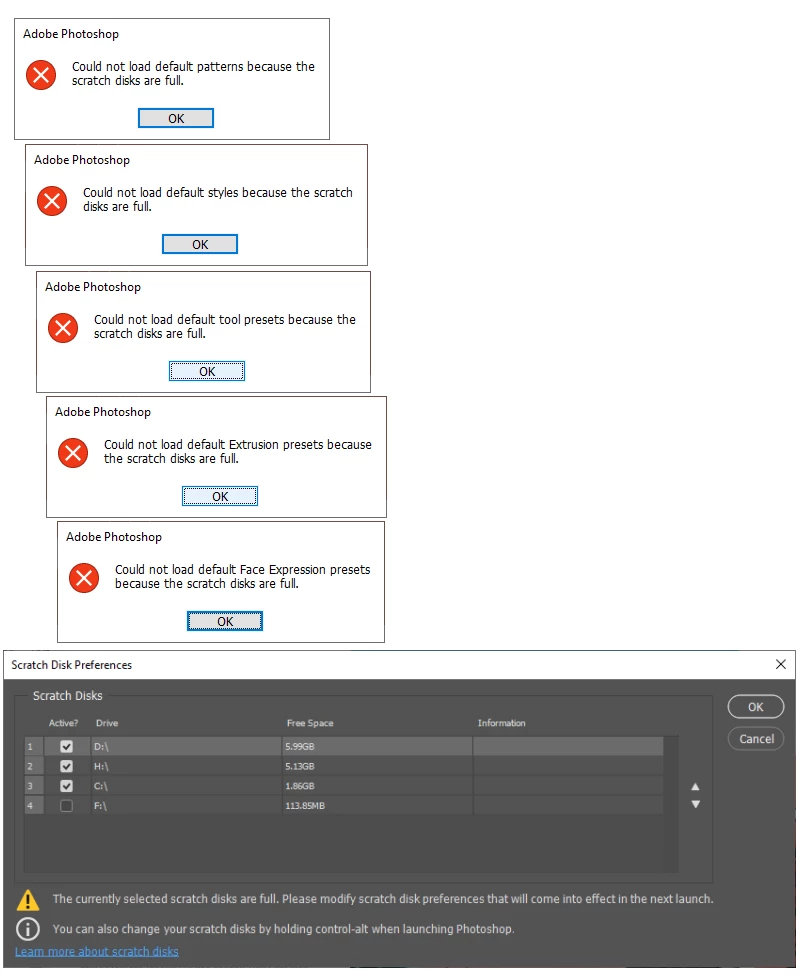
When i click OK... it's gone.

No active process in task manager, nothing.

HELP! I need to work!

This topic has been closed for replies.

2 replies

D Fosse
Community Expert
Community Expert
December 4, 2020

Your disks are full. That's all there is to it. You need to free up a lot of space in a hurry, or you will soon have bigger problems than Photoshop. 1 GB free on the system drive is an emergency situation that you need to deal with immediately.


"Scratch disk" is not a Photoshop setting. It's real physical disk space, and you have nothing left.


I see you have an F drive with 100GB or so. That shoud be enough to let Photoshop work for a while, but that's a moot point when your whole machine can freeze up at any minute now.

December 4, 2020

"I see you have an F drive with 100GB or so"

That's MB not GB, unless my eyes are deceiving me

D Fosse
Community Expert
Community Expert
December 4, 2020

Oops, yes indeed...it's a miracle that machine still runs.

December 4, 2020

And here lies your problem

You really need to free up space on your system drives, you're going to run into issues on an operating system level never mind Photoshop

milekpiatek
Participant
December 4, 2020

Before update it worked like a charm, how much space i need now? Here's 12 GB free space in total, isn't it enough just to RUN a program?

davescm
Community Expert
Community Expert
December 4, 2020

Here Photoshop takes over 5GB scratch space before I open a single file. while working, the scratch disk file can commonly grow to 100GB. So no, you do not have enough space on your disks

Dave