
Graxen
Participant
September 8, 2021
Question

Photoshop doesn't use all my RAM

  • September 8, 2021
  • 3 replies
  • 557 views

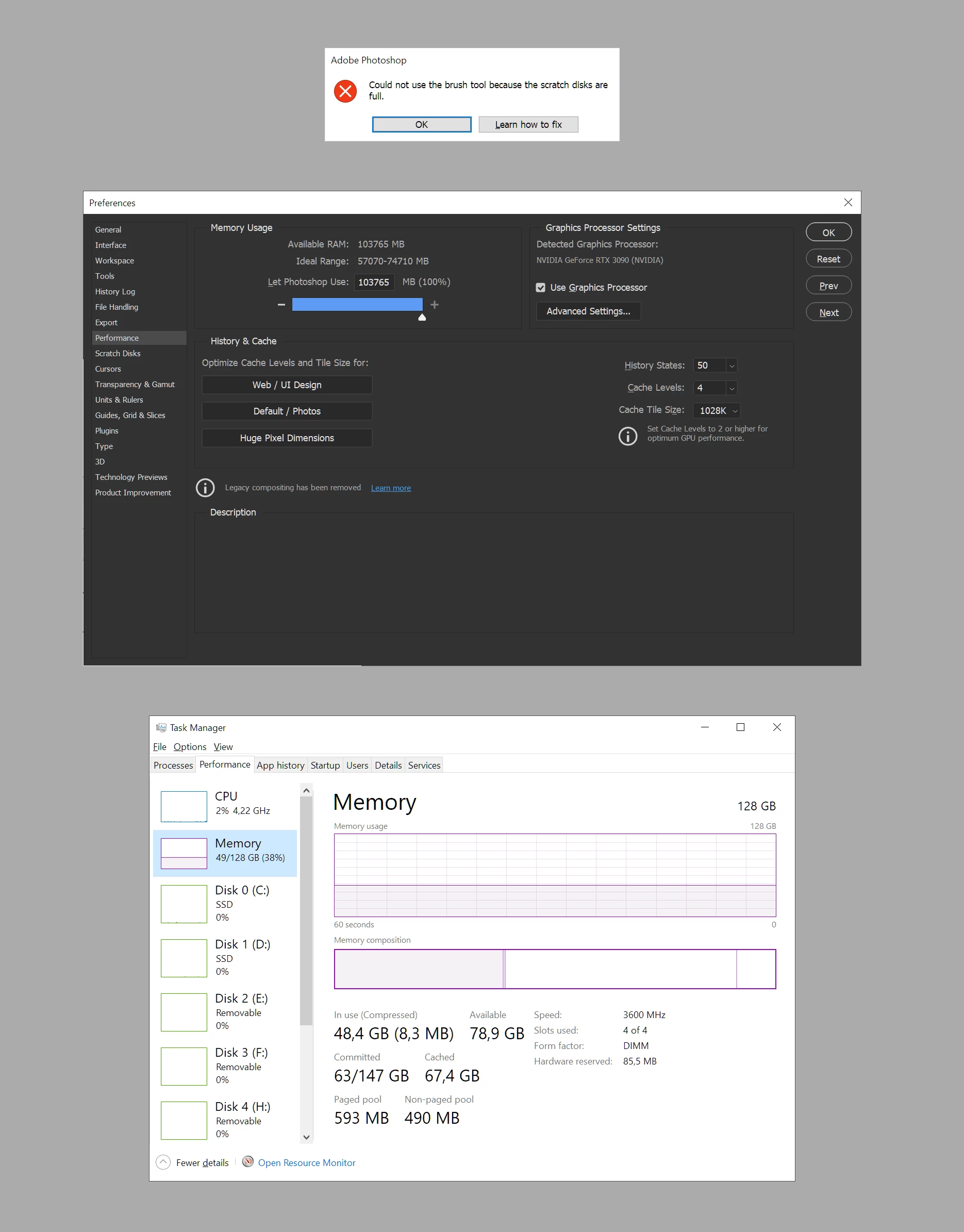
Photshop gives me "scratch disks full" messages even though I'ave got over 78 GB of avalible RAM.

I'm letting Photoshop use 100% of the available RAM as of the picture below.


The system information from Photoshop says it's using 100% of the RAM, but also that there is 120041 MB free?


What to do? 😞


Adobe Photoshop Version: 22.5.0 20210809.r.384 ce617de x64
Number of Launches: 227
Operating System: Windows 10 64-bit
Version: 10 or greater 10.0.19041.1151
System architecture: AMD CPU Family:15, Model:1, Stepping:0 with MMX, SSE Integer, SSE FP, SSE2, SSE3, SSE4.1, SSE4.2, AVX, AVX2, HyperThreading
Physical processor count: 16
Logical processor count: 32
Processor speed: 3400 MHz
Built-in memory: 130986 MB
Free memory: 120041 MB
Memory available to Photoshop: 103765 MB
Memory used by Photoshop: 100 %


This topic has been closed for replies.

3 replies

D Fosse
Community Expert
Community Expert
September 9, 2021

I'd put it in stronger terms than Ged: never set memory allocation to 100%! Other applications and system processes need memory too. Even the ACR plugin runs outside Photoshop's address space, and requires its own memory separate from Photoshop.


There is no such thing as "enough RAM" anyway. That's why the scratch disk is there. Photoshop requires much more memory than any RAM you may have installed, and this temporary working data are written to disk. This is the scratch disk, and it will take the really heavy lifting. Think of the scratch disk as Photoshop's main memory, and RAM as a fast access cache.


You need a lot of free space for the scratch disk! 200 GB or so is the absolute bare minimum, but 500 GB or more is recommended.

Ged_Traynor
Community Expert
Community Expert
September 8, 2021

Hi

How much free space do you have for the scratch disk, also it's recommended to let Photoshop use about 70% of RAM, how large are the files your working on

Mylenium
Legend
September 8, 2021

Actually your disks showing zero activity does not bode well. Even in idle modes Windows will have one to three percent activity on the system drive. An excursion to your disk management tool and device manager may be advisable. That may also give us more info to work with.


Mylenium