
Photoshop Drop-Down Menu Options too Small
Had this issue previously, and now it's become a larger problem since I've updated to the latest Photoshop. Photoshop's drop-down menu items are so small that they're irritating to read. It's like trying to read fine print in a contract and has slowed productivity because it takes me longer to read and select them..
I've tried suggestions to increase the UI font size or the UI interface. These have not solved the problem. Increasing the font size has not seemed to change anything. Changing the UI interface isn't what I want at all. The rest of the interface is appropriately sized on my screen, so making it larger creates more problems.
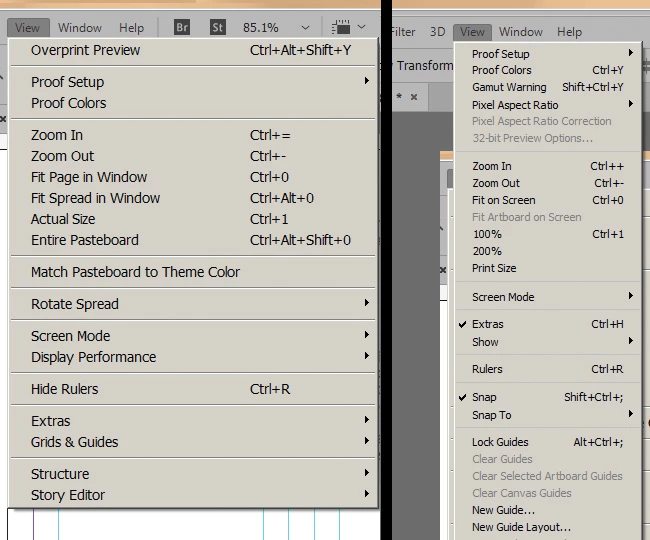
InDesign drop-down options (left) versus Photoshop screenshot (right) below. Photoshop on the right is set to "large" UI font size. Notice how the top menu options are the same size, but the drop-down options in Photoshop are too tiny.
 AdChoices