Participant
January 19, 2019
Answered

Photoshop Error

  • January 19, 2019
  • 2 replies
  • 631 views

Hello Community,

need your help and I have the following problem with Photoshop CC as soon as I have created a new image and would like to put a text on the image he tells me. . . the process could not be executed because a program error has occurred. He doesn't tell me which one.

I'd be happy to get back to you soon.

best regards

Thomas

( SRY for my bad english )
    This topic has been closed for replies.
    Correct answer

    Version 20.0.2


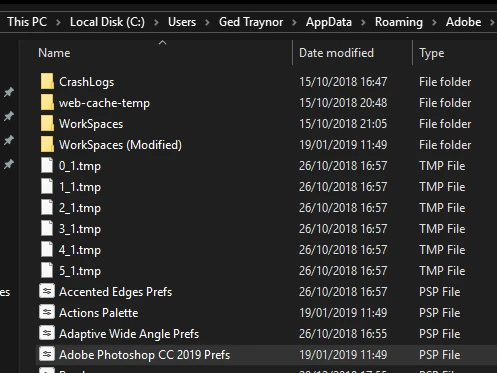
    Close Photoshop and try deleting the Adobe Photoshop CC 2019 Prefs file from this location

    C:\Users\Your Name\AppData\Roaming\Adobe\Adobe Photoshop CC 2019\Adobe Photoshop CC 2019 Settings

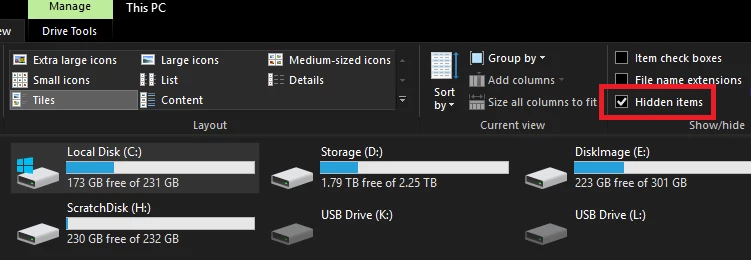
    You may need to enable this option in file explorer

    2 replies

    Participant
    January 19, 2019

    Hi Jane,

    error message => The operation could not be executed, a program error has occurred.

    my system => Windows 10

    Photoshop Version => Photoshop CC

    Regards

    Thomas

    January 19, 2019

    Hi

    What exact version of Photoshop do you have, go to the help menu and click on About Photoshop CC

    Participant
    January 19, 2019

    Version 20.0.2

    jane-e
    Community Expert
    Community Expert
    January 19, 2019

    Hi Thomas,

    Can you please post a screen shot of the error message? Or give us the exact words?

    Also, what is your operating system? What exact version of PS CC?

    ~ Jane