
CGraph
Participant
September 29, 2023
Question

Photoshop Error

  • September 29, 2023
  • 3 replies
  • 305 views

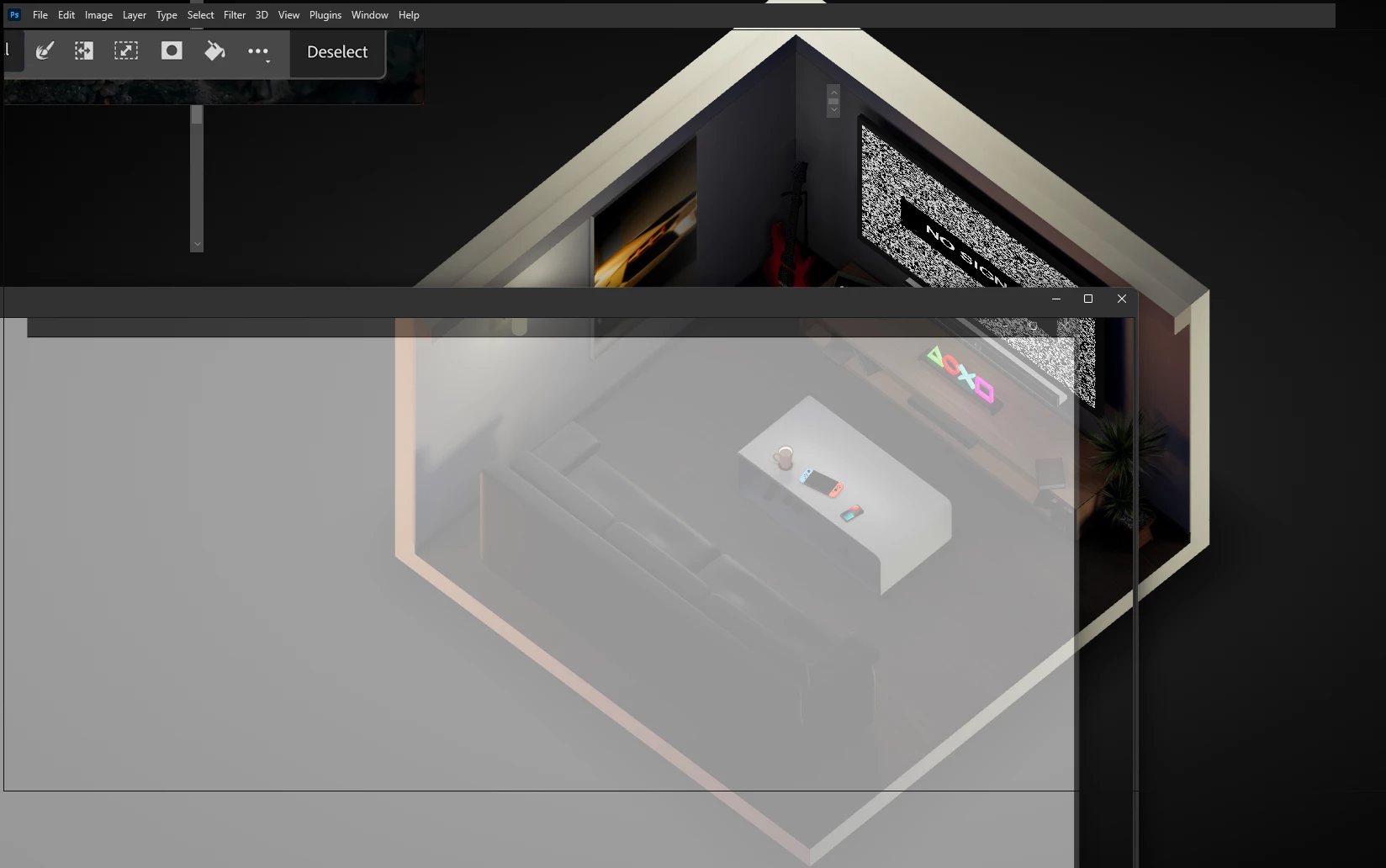
I've been trying to open Photoshop, my version is 2024 the Creative Cloud version. And everytime I do it. It opens as usual, but when it does it loads 0 of the interface, and instead the only the bar on top and some buttons load in, everything else is either bugged or invisible? Can anyone help? There seems to be 0 help guides on this issue, and I've tried to do everything without any solution.


The room, is my desktop background. I have no idea how to fix this photoshop error at all.
 

This topic has been closed for replies.

3 replies

CGraph
CGraphAuthor
Participant
October 5, 2023


My Photoshop works again. Thank you guys for doing your best to help me.

CGraph
CGraphAuthor
Participant
October 1, 2023

I tried that, however it didn't work. Thank you for trying to help.


Ged_Traynor
Community Expert
Community Expert
September 30, 2023

@CGraph try manually resetting your Photoshop preferences
https://helpx.adobe.com/ie/photoshop/using/preferences.html#Manually
Remember to backup your settings before doing the preference reset
https://helpx.adobe.com/ie/photoshop/using/preset-migration.html