It looks like you are using two GPUs
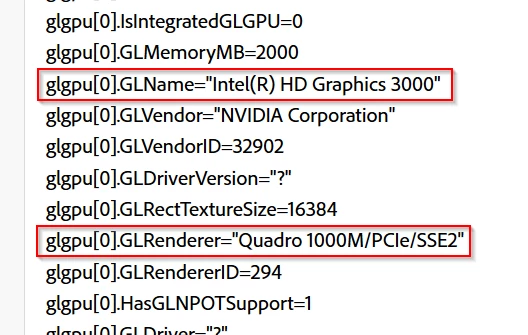
Photoshop is known not to like more than one GPU, and it can cause problems if the drivers conflict
(Scroll down to Does Photoshop take advantage of more than one graphics processor.
Photoshop graphics processor (GPU) card FAQ
If this is what is happening, then you might be able to disable the Intel HD3000 in BIOS or it's preferences. So is this a lpatop by any chance? We often see this sort of situation where a laptop switches between GPUs to save battery power.
It look strange like a single open GL GPU[0] is listed but made by two companies Intel and Nvidia. So as Trevor wrote there seems to be two GPU in your machine. See if you can use thr Nvidia control panel and make the Nvidia adapter the prefered GPU for Photoshop.

 AdChoices