

Amybeth M. ACI G7
Community Expert
Community Expert
January 7, 2020
Answered

Photoshop Eyedropper tool

  • January 7, 2020
  • 3 replies
  • 2649 views

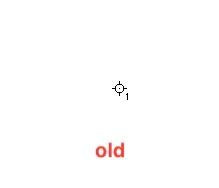
For the life of me, the old photoshop(2019) had numbers when I dropped multiple eyedroppers and now they have only magenta rings. Do you know where the prefence to change this is? It dosnt seem to be effected by the cursor options?

This topic has been closed for replies.
Correct answer gener7

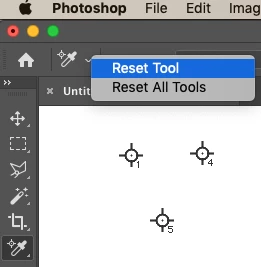
This CC 2020 (21.0.2) and this is what it should look like.


Try resetting the sampler eyedropper.


3 replies

Amybeth M. ACI G7
Community Expert
Community Expert
January 7, 2020

its actually CC 2019 (which I use for training purposes) that is wonky. I reset tools and prefernces on Quit. Still the same.

Going to restart thank you !

Amybeth MACI G7 Certified Expert
Amybeth M. ACI G7
Community Expert
Community Expert
January 7, 2020

apon restart it is back to the defaults! thank you 

Amybeth MACI G7 Certified Expert
gener7
Community Expert
Community Expert
January 7, 2020

Ok, I'm glad to hear you are back in business. Unless you are having problems everywhere, I start with Tools and Preferences, and yes a Mac Restart helps too.

gener7
Community Expert
gener7Community ExpertCorrect answer
Community Expert
January 7, 2020

This CC 2020 (21.0.2) and this is what it should look like.


Try resetting the sampler eyedropper.


gener7
Community Expert
Community Expert
January 7, 2020

If that fails, go for a Preference Reset:

jane-e
Community Expert
Community Expert
January 7, 2020

Hi

Do you mean the Color Sampler tool or something else? If you mean the Color Sampler tool, open the Info panel from the Window menu to see the numbers. Or ask again if you mean something else.

~Jane