
dblvr
Participant
August 10, 2021
Question

photoshop filter gallery issue

  • August 10, 2021
  • 1 reply
  • 181 views

Hello, adobe community!


I am facing some issues with my filter gallery.


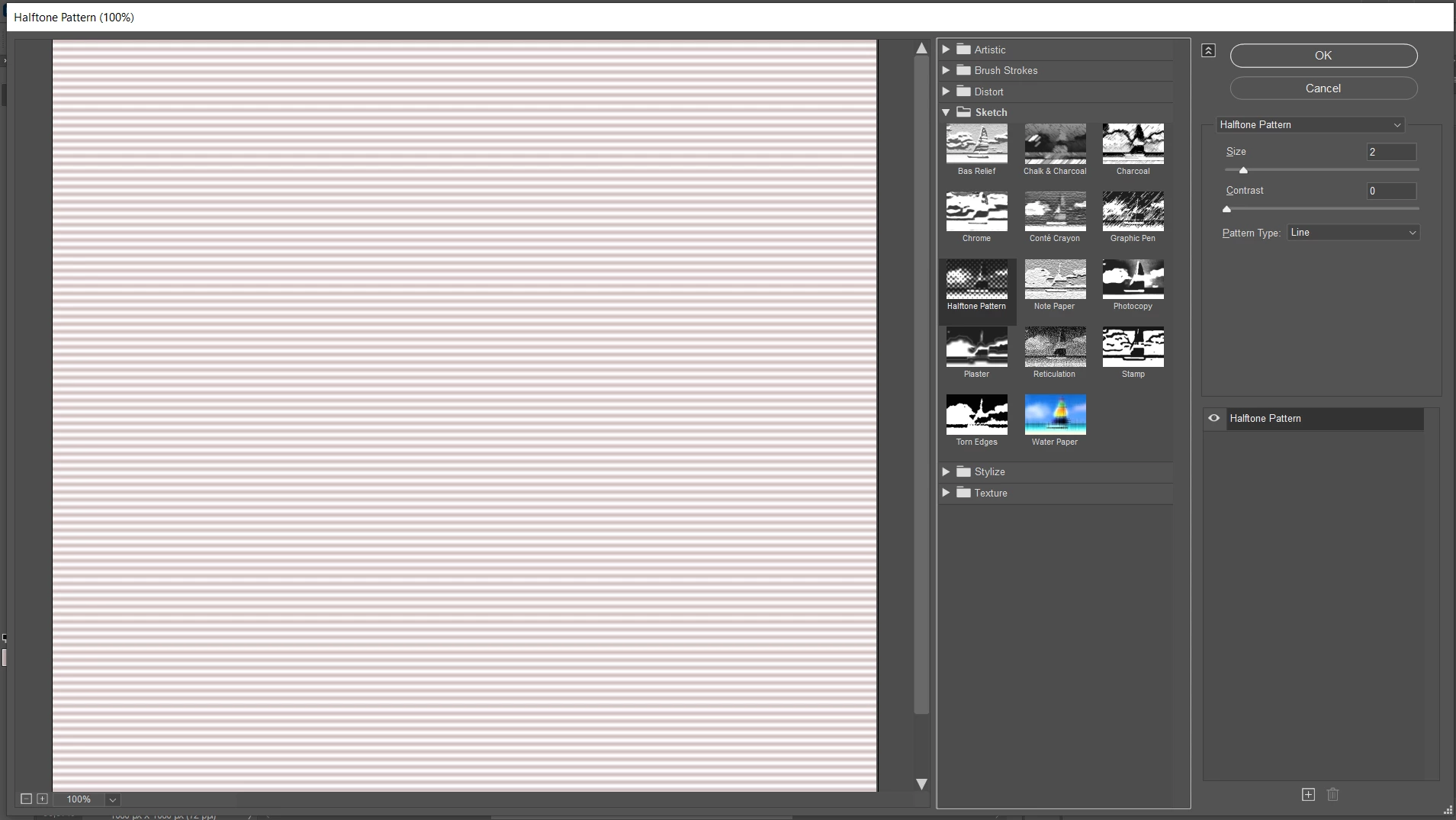
I don't even how to describe the problem, so I am attaching a screenshot.


The halftone filter is not working properly. It is not that vivid as it was when I first installed the software. I have tried to reinstall the photoshop. It worked just for one day. The next day the same issue came out. Some of the filters are not working at all.


The image mode is RGB color and 8 bits/channel.


Can anyone tell me what the problem might be?


Thank you!


This topic has been closed for replies.

1 reply

c.pfaffenbichler
Community Expert
Community Expert
August 10, 2021

Could you please post screenshots with the pertinent Panels (Toolbar, Layers, Options Bar, …) visible? 

What are the Foreground and Background Colors? (To reset them hit D)

dblvr
dblvrAuthor
Participant
August 10, 2021

Oh, man! You can't image how thankful I am to you. You just saved me my time. I've been facing the issue since yesterday and trying to work it out.


The solution was to bring back the default color of foreground. It was gray. That's why the filter effect was vague. I mean I had to make the foreground color solid black. It worked. 


Thank you so much!