
Sarah13242
Participating Frequently
February 24, 2026
Answered

Photoshop freezes when trying to change the size or hardness of the brush.

  • February 24, 2026
  • 3 replies
  • 104 views

After the last update 27.4, Photoshop freezes when trying to change the size or hardness of the brush. It only helped to switch back to the previous version 27.3.1
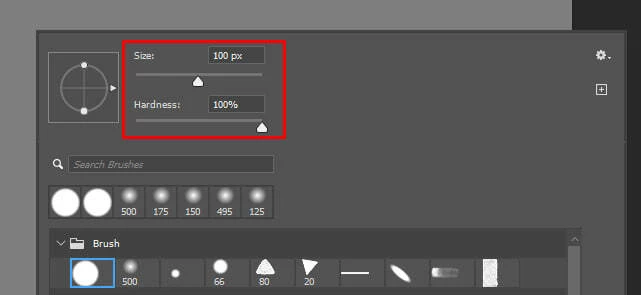
 

There are no errors when the program freezes, and if you minimize the application and expand it, it will restore. But the brush settings won't change, and if you try to change them again, Photoshop freezes again.

    Correct answer Ged_Traynor

    @Sarah13242 I cannot replicate the issue with Photoshop version 27.4 on my system, have you tried resetting your Photoshop preferences

    https://helpx.adobe.com/ie/photoshop/desktop/get-started/settings-and-preferences/reset-preferences.html


    3 replies

    jane-e
    Community Expert
    Community Expert
    February 25, 2026

    @Sarah13242 

    This is a duplicate post. Please continue the discussion in your original thread. This one is now locked.


    EDIT: someone merged the locked duplicate thread into the original thread, which is unlocked.


    Jane


    Sarah13242
    Participating Frequently
    February 25, 2026

    After the last update 27.4, photoshop starts to freeze when I try to change the brush size or hardness. The problem occurs when I try to change the values in this window or in the "Brush settings"


    If i press "alt+tab" (I use windows 11), Photoshop unfreezes, but the brush values will not change.

    If i change the brush size using the "[" and "]" hotkeys, then freezes do not occur. Also, if you go back to the update 27.3.1, there are no freezes.


    Here is a video example of the problem:


    Yesterday, I was recommended to try resetting Photoshop preferences: https://helpx.adobe.com/ie/photoshop/desktop/get-started/settings-and-preferences/reset-preferences.html

    and I mistakenly thought that the problem had been solved, but unfortunately it remained. 😓

    Known Participant
    February 26, 2026

    After an hour of working in PS, the problem went away, but it’s there whenever i restart PS. Very strange and annoying.

    Ged_Traynor
    Community Expert
    Ged_TraynorCommunity ExpertCorrect answer
    Community Expert
    February 24, 2026

    @Sarah13242 I cannot replicate the issue with Photoshop version 27.4 on my system, have you tried resetting your Photoshop preferences

    https://helpx.adobe.com/ie/photoshop/desktop/get-started/settings-and-preferences/reset-preferences.html


    Sarah13242
    Participating Frequently
    February 24, 2026

    I tried, it helped! Thank you very much! 🙃