Participant
December 23, 2021
Question

Photoshop Graphics Cards

  • December 23, 2021
  • 2 replies
  • 1639 views

PLEASE HELP!


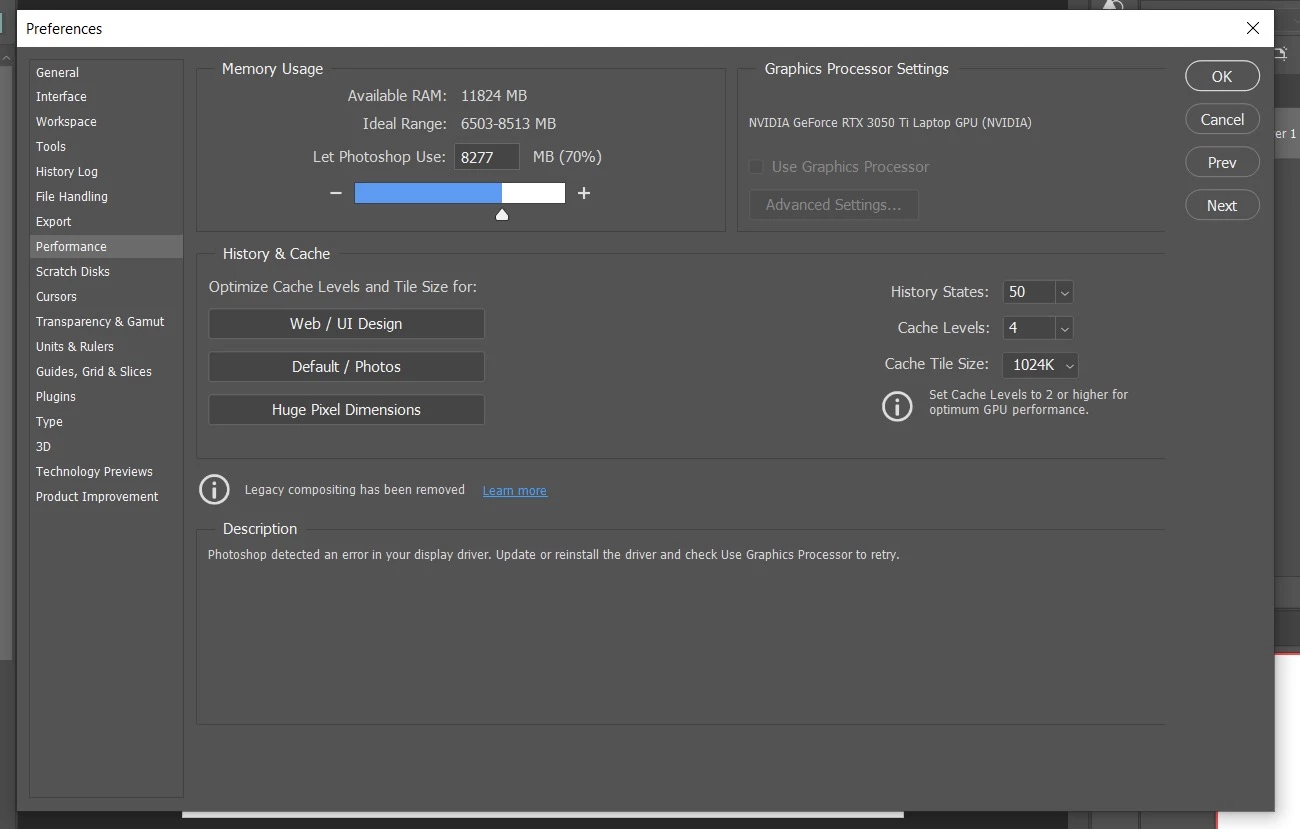
I've updated my graphics cards and it seems that Graphics Processor Settings is greyed out. So, a lot of the features that I like using in photoshop are weird. Everything worked fine until I updated the card.  

'I work on a window 10 (everything is up to date) 

Photoshop is up to date as well

NVIDIA GeForce RTX 3050 Ti Laptop GPU (NVIDIA)

 

You need to ask program questions in the forum for the program you are using
To ask in the forum for your program please start at https://community.adobe.com/
Moving from Using the Community (which is about the forums) to the correct forum... Mod

This topic has been closed for replies.

2 replies

Ged_Traynor
Community Expert
Community Expert
December 23, 2021

Hi

Some laptops have 2 GPU's, the dedicated GPU and either an Intel or AMD onboard GPU, have you updated the driver for the onboard GPU as well.

For the Nvidia GPU Adobe recommends installing the Studio driver

https://www.nvidia.com/Download/driverResults.aspx/184241/en-us

When installing perform a custom install from the advanced options and select clean install

Also take a look here, especially sections 7 and 8

https://helpx.adobe.com/photoshop/kb/troubleshoot-gpu-graphics-card.html

Dave Creamer of IDEAS
Community Expert
Community Expert
December 23, 2021

Just to be clear--did you update your entire card or just the drivers?

David Creamer: Community Expert (ACI and ACE 1995-2023)