
Inspiring
April 21, 2022
Question

Photoshop Hogging Memory

  • April 21, 2022
  • 1 reply
  • 286 views

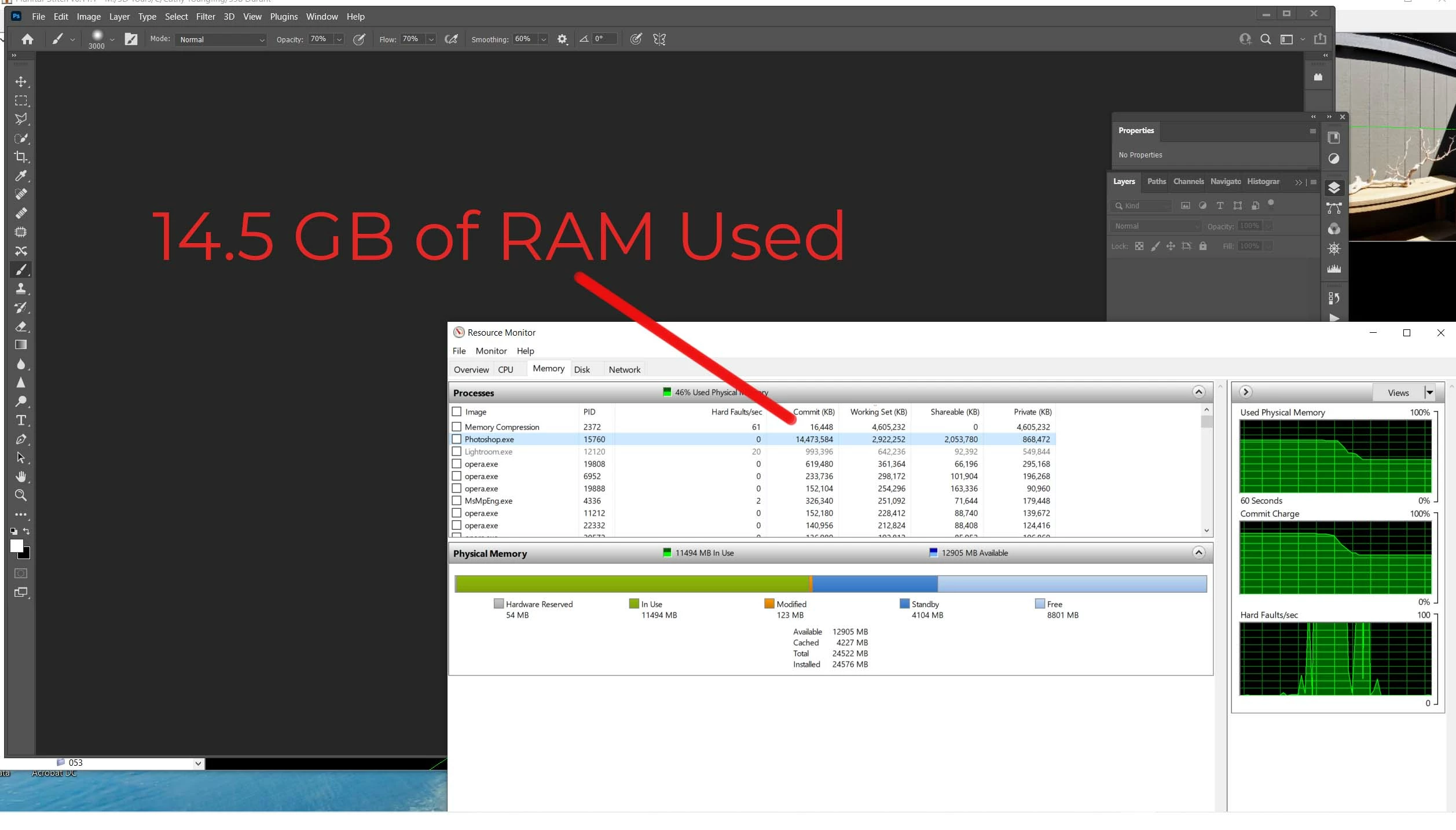
Photoshop recently seems to be hogging memory. For example, I have photoshop open but with NO images open, and it is using 14.5 GB of RAM. Again, with NO documents open. 


This seems to have started recently. I have ALWAYS opened numerous documents at a time in Photoshop, often with as many as 20 layersof stacked RAW photos per document. Over the last two weeks, it seems if I open up just one or two documents with just a handful lf layers per document, Photoshop comes to a crawl, memory usage goes beserk, it crashes, etc.,


I am on Windows 10 using Photoshop 22.5.6 release (I can't update to the newest release of photoshop because my scripts don't work in the newest release).


Thanks in advance.
This topic has been closed for replies.

1 reply

Sameer K
Community Manager
Community Manager
April 21, 2022

Hi Mark,


Thanks for reaching out. We are sorry for the trouble with Photoshop. We are here to help.

Do you have sufficient free space of at least 20GB on the internal drives for scratch disk allocation? Could you please share the system info of the machine from Help > System info?

Have you tried any troubleshooting steps so far?


As the update is not an option for your workflow, please try to launch Photoshop while pressing the Shift key to skip loading any plugins and extensions to check if it works normally.

If this does not work, go to the location of the preference folder mentioned below and rename it to backup it. 

https://helpx.adobe.com/photoshop/using/preferences.html

  • Windows 10/11: Users/[user name]/AppData/Roaming/Adobe/Adobe Photoshop [version]/Adobe Photoshop [version] Settings
  • Rename the Adobe Photoshop folder by adding a .old at the end. (Adobe Photoshop 2021 > Rename > Adobe Photoshop 2021. old)


These changes will give a fresh start to Photoshop as a fresh install. We hope this helps.


Let us know if it works.

Thanks!

Sameer K

Easy MarkAuthor
Inspiring
April 28, 2022

"Do you have sufficient free space of at least 20GB on the internal drives for scratch disk allocation?"


Yes, I have over 100 GB free on my scratch disk, which is an SSD (separate from my OS / Applications disk, which is also an SSD)/


"Could you please share the system info of the machine from Help > System info?"


OS Name Microsoft Windows 10 Home
Version 10.0.19044 Build 19044

System SKU LENOVO_MT_90FB_BU_LENOVO_FM_ideacentre 710-25ISH

Processor Intel(R) Core(TM) i7-6700 CPU @ 3.40GHz, 3408 Mhz, 4 Core(s), 8 Logical Processor(s)

Installed Physical Memory (RAM) 24.0 GB

Total Virtual Memory 43.5 GB

Page File Space 19.5 GB

Graphics Card: mvidea RTX 2060 Super, 8GB VRAM


"As the update is not an option for your workflow, please try to launch Photoshop while pressing the Shift key to skip loading any plugins and extensions to check if it works normally."


I still get the same problem that Photoshop (and Lightroom, too) use up much more memory before and cuase my programs to crash or won't let me save the Photoshop file.


"If this does not work, go to the location of the preference folder mentioned below and rename it to backup it. "


I have done that, too, and I still have the same memory problem.