
Known Participant
November 9, 2024
Question

Photoshop hogging memory for decades

  • November 9, 2024
  • 3 replies
  • 486 views

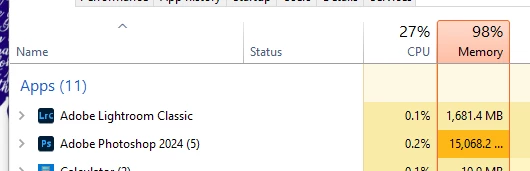
Ever since I first started using PS it has hogged memory for no reason at all. Here it is sat hogging 15GB with one small file open. Yes I know I can set a limit to it but I want to let it use memory when it needs to, not grind my system to a halt while doing nothing - why has this been a problem for 2 decades?


This topic has been closed for replies.

3 replies

D Fosse
Community Expert
Community Expert
November 9, 2024

Cross posting, saying the same thing, short and long version 🙂

D Fosse
Community Expert
Community Expert
November 9, 2024

First of all, never set Photoshop memory allocation to 100%! It will be taken, and then all your other applications and processes choke. It will slow everything down and eventually grind to a full halt.


The thing is, Photoshop will need a lot more memory than your installed RAM. That's why Photoshop uses a scratch disk, to write temporary working data to disk. That's Photoshop's main memory as you work. RAM acts more like a fast access cache.


In other words, it's much more important that you have enough, fast, scratch disk space, than the amount of memory you assign to Photoshop. Whatever you do assign, will be taken up very quickly, and it won't be released again until you close Photoshop. It will be recycled and reused.


With slightly less RAM, Photoshop will just hit the scratch disk slightly more often. That used to be a rather big deal back when hard drives were slow spinning disks, with a read/write head that could only be in one place at a time. Today, with ultra-fast NVMe drives, the amount of RAM is a lot less important. For all practical purposes, the scratch disk will be as fast.


In short, dial it down to 70% at most. Those 70% will be saturated quickly, and that is not a problem. Just leave enough for the rest of your system.


Even the ACR plugin runs outside Photoshop's address space, and needs its own memory separate from Photoshop.

davescm
Community Expert
Community Expert
November 9, 2024

It was designed that way for speed. Photoshop uses RAM, up to the maximum allocated, but does not hand it back to the operating system, otherwise it would be necessary to request it each time. The OS can get back the memory should it need it.
Never set the memory allocation in preferences to greater than 75% or you will start to see issues.
Dave

Known Participant
November 9, 2024

What a ridiculous way of doing things - and totally illogical. No other program that I have ever used causes this problem. So it basically hogs all the memory to save a millisecond when loading a new file? Wonderful.

D Fosse
Community Expert
Community Expert
November 9, 2024

@JasonBatley 

You haven't considered the implications. Batch processing would be glacial to impossible.