Photoshop HSL not changing colors correctly
Heads up, I like to ramble be detailed in explaining things. (Maybe it's my autism, maybe it's Maybelline). So TL;DR: Photoshop is doing things with color that I'm not used to. I work in CMYK often and haven't seen this before. Why does adding a HSL adjustment layer, then turning the lightness down to 0 NOT make my whole canvas black (CMYK black, rich black, etc)? It should be one solid dark color, not a variance of low saturation hues and values.
What it's doing vs. what I expect it to do, as I have observed while working in CMYK previously:

- I am not proofing colors
- Gamut warning is off
- I have not messed with other HSL sliders, nor have I used other adjustments
- This canvas is set to color profile "Working CMYK - U.S. Web Coated (SWOP) v2" which is the default.
- 16 bit, CMYK, don't color manage.
- I have uninstalled and reinstalled photoshop, keeping NONE of the previous settings.
And now for the long part...
I use photoshop for work. I've used this adjustment many times in the graphics I make for this job. I've never seen it do this. It seems to absurdly de-saturate colors that work perfectly well in CMYK and shorten the value range of the image if I move the lightness slider to 0. I have observed, and expect it, to basically turn the whole canvas black. In the above screenshot I used 100% black but rich black/cmyk rich black would be fine too. It's changing the colors entirely instead of just darkening existing colors. Likewise, if I move the slider the other direction, 100% lightness, the image does not turn completely white like I would assume, but washes out the image with varying low-saturation hues.
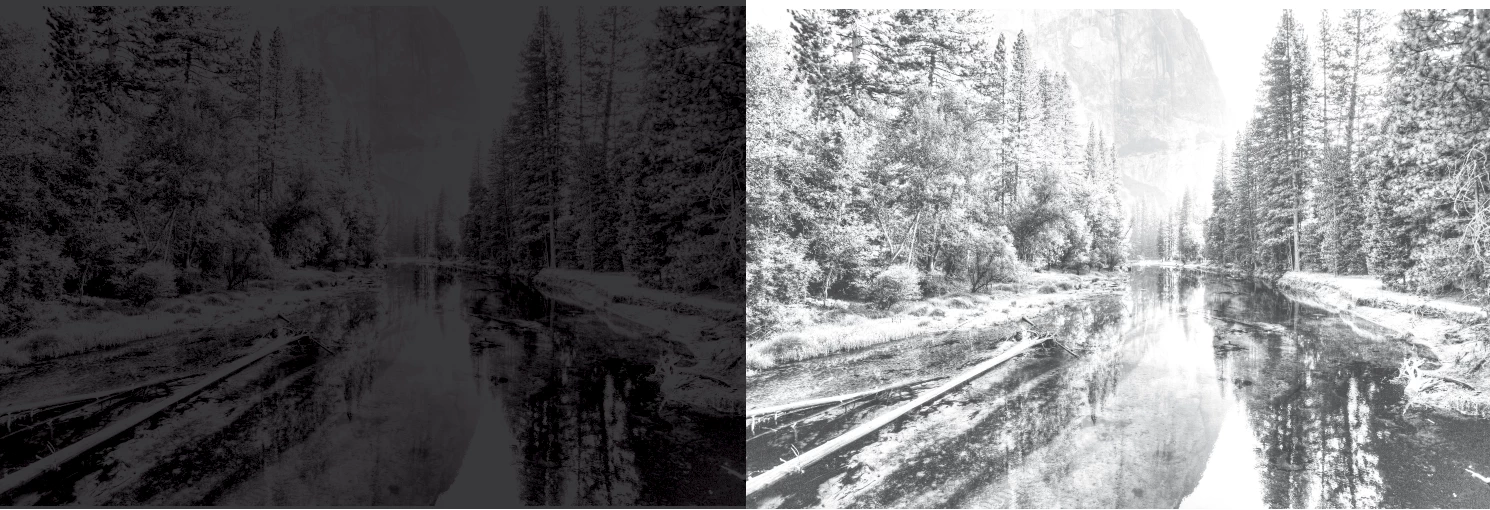
I've been using photoshop at this job, with this lisence, on this computer, for a year. I have never seen this happen before. I tried to google it and just got a lot of "How to turn RGB into CMYK" which isn't what I'm trying to do. I use other (non adobe) programs at home, and haven't messed with a lot of photoshop settings here at work. I have a couple preferences set and just...never changed them. I'm not calibrated to the printer we use (it's a news press much of the time) and that would be too much to ask currently. What I make in the good old fashioned default CMYK color profile works just fine for our needs.
When I do this kind of adjustment I expect a color to just decrease in value, not create drastic difference in saturation (obviously saturation will decrease when value does, but not the same way its happening here), and not change hue. But this one lightness slider seems to be changing all of them.
If I do an eyedropper on the canvas after the adjustment it gives me colors like this:
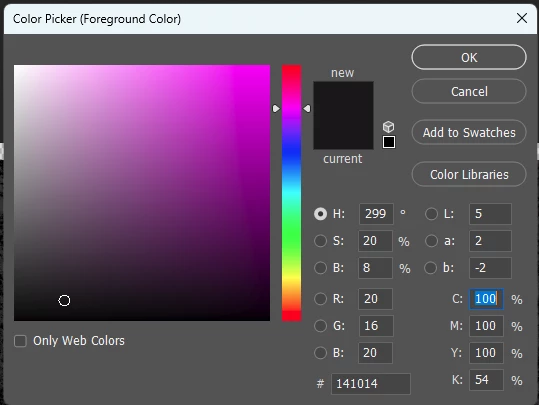
Why is it making the CMY values so high? I also tried moving the saturation slider completely to 0 to try to get rid of ANY CMY values and it changed nothing.
What am I missing? What don't I know about photoshop?
Thanks in advance.
 AdChoices