
Frank from Like2movit
Participant
December 12, 2023
Answered

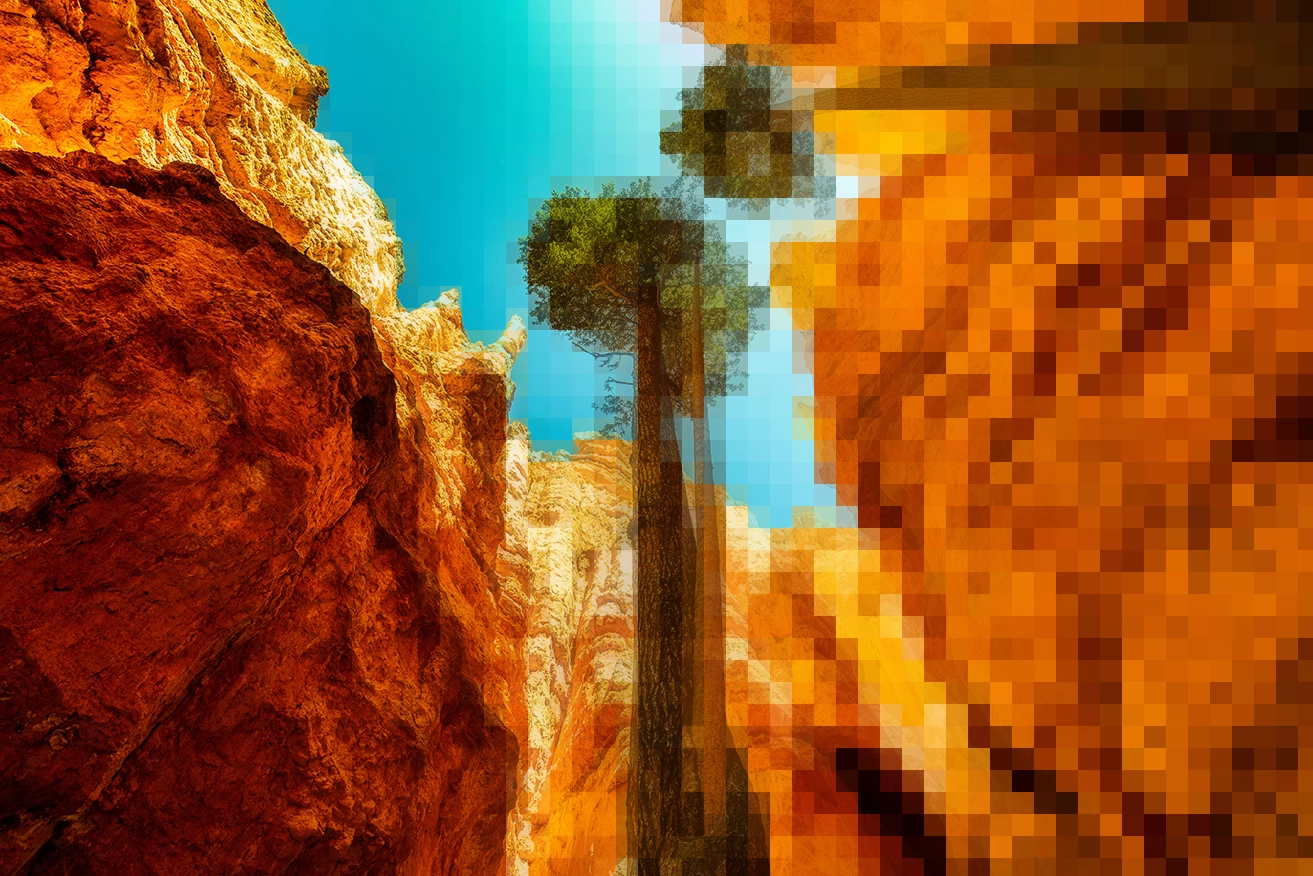
Photoshop image from small pixels on one side of the image to large digital pixels on the other side

  • December 12, 2023
  • 2 replies
  • 561 views

Hello community,
I want to manipulate a photo, visualize a normal situation and move towards digital (larger pixel blocks are associated with digitization). I would like 50% of the photo with normal pixel quality, and than on one side (corner) that everything becomes digital, using real large pixels (blocks). Does anyone know if there is a way or filter to get this effect?
Thank you very much for all the suggestions/solutions,
Frank
This topic has been closed for replies.
Correct answer Myra Ferguson

There is the Mosaic filter (Filter > Pixelate > Mosaic...) that lets you make blocks from an image, but you can only set one Cell Size. If you make a gradient selection (Select > Edit in Quick Mask Mode and draw a gradient from black to white with white where you want the effect to show more and then exiting Quick Mask Mode), then your image would go from not have any blocks to fading into the blocks. You could make the blocks fairly large so that the transition is more apparent.


You'd probably need a script if you wanted the Cell Size to change from smaller to larger blocks.

2 replies

Myra Ferguson
Community Expert
Myra FergusonCommunity ExpertCorrect answer
Community Expert
December 12, 2023

There is the Mosaic filter (Filter > Pixelate > Mosaic...) that lets you make blocks from an image, but you can only set one Cell Size. If you make a gradient selection (Select > Edit in Quick Mask Mode and draw a gradient from black to white with white where you want the effect to show more and then exiting Quick Mask Mode), then your image would go from not have any blocks to fading into the blocks. You could make the blocks fairly large so that the transition is more apparent.


You'd probably need a script if you wanted the Cell Size to change from smaller to larger blocks.

Semaphoric
Community Expert
Community Expert
December 12, 2023

You could also use the brute force, by hand method instead of a script, but it's very tedious. You would run the Mosaic filter on a selection, and then transform the selection by reducing it by an integer multiple of the next mosaic block size, so the sizes will progress with the edges in alignment.

Frank from Like2movit
Participant
December 12, 2023

Thank you for the suggestion Semaphoric!

jane-e
Community Expert
Community Expert
December 12, 2023

@Frank from Like2movit 


I've read your post five times and keep coming up with different ways to interpret it. Can you show a screenshot or make a rough sketch?


Jane

Frank from Like2movit
Participant
December 12, 2023

Hello Jane, thank you for your answer. I understand that my question can be interpreted in different ways. Myra's example is close to the effect I'm looking for, but would like to have about 2 more steps with smaller blocks in between, to gradually emphasize 'going from now to becoming fully digital