Participant
March 8, 2018
Question

Photoshop Image Size

  • March 8, 2018
  • 5 replies
  • 283 views

Hi all,

Was hoping someone could point me in the right direction.

I have a document whereby I have changed its width to 630mm (from 210mm) by going to 'Image' at the top of the page and then 'Image Size'.

The length of the document has naturally changed in proportion to 1409.53.

Everything looks fine.

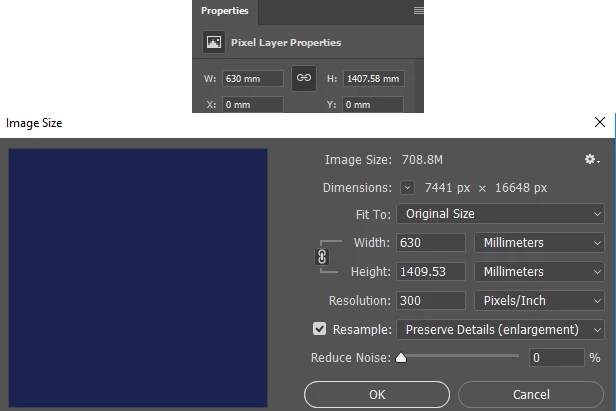
But when I look across to the right side of my screen, there is a section which says 'Pixel Layer Properties' and beneath it says 630mm x 1407.58 (see below).

Why would it say a length of 1407.58 when if I got to image size it states 1409.53? Please see attached screenshot.

Although they are very close in size, which one is the actual size of the document for printing purposes?

Any help would be very much appreciated.

Regards

Mark
    This topic has been closed for replies.

    5 replies

    Legend
    March 8, 2018

    If in doubt, do arithmetic...

    16648 pixels / 300 ppi = 55.4933... inches

    * 25.4 = 1409.5306... mm

    The figure 1407.58mm corresponds to about 16624 pixels at 300 ppi. Are you sure your pixel layer is full height?

    D Fosse
    Community Expert
    Community Expert
    March 8, 2018

    You can do the math yourself if you want a definitive answer. Get out your calculator.

    Photoshop works only in pixels. You have 16648 pixels. That's the Photoshop baseline.

    Then you have 300 pixels per inch. That gives you size in inches, which you then have to translate to millimeters. That's all there is to it.

    ---

    Another thing is that you don't need a resolution of 300 ppi at that print size. 120-150 should be more than enough. 300 is for book and magazine print where it's seen at less than arm's length - this will be seen from much farther away.

    As a very quick and dirty rule of thumb, anything that requires more than 10 000 pixels is probably overkill, except in some very special circumstances.

    MWAINAuthor
    Participant
    March 8, 2018

    Hi i'm working on Photoshop CC

    macpawel
    Participating Frequently
    March 8, 2018

    It really difficult to exact count pixels to milimeters.

    If you need to maitain proportions - sometimes it may happen - it's normal

    pawel

    MWAINAuthor
    Participant
    March 8, 2018

    Thank you very much for your help

    Derek Cross
    Community Expert
    Community Expert
    March 8, 2018

    Yes, it's always advisable to work in pixels with images in Photoshop.

    Derek Cross
    Community Expert
    Community Expert
    March 8, 2018

    Which version of Photoshop do you have?