Participant
May 4, 2019
Answered

Photoshop Independent Scaling Question

  • May 4, 2019
  • 2 replies
  • 372 views

I'd like to create pixel art over the top of actual photos. I want the photo in the background, at an appropriate size for me to be able to draw a single pixel dot, that will cover a larger area of the photo. I can't scale the photo down or it will just get fuzzy because it's losing it's resolution, so it has to be some kind of virtual image in the background. Trying to achieve a look like drawing a person 50 pixels high on top of a full resolution picture of a person. How can I do this?
This topic has been closed for replies.
Correct answer Semaphoric

You could do it like this:

Assuming your image is just a single background layer, duplicate that layer, and make it a Smart Object. In the Layers panel menu, choose Edit Contents. The SO will open in a new window. Scale it down with Image Size with Nearest Neighbor,, using a percentage that will easily scale back up to 100% later, like 20%. You'll probably want to zoom in. Your image will look all pixelated, but it doesn't matter.

Add  a new layer, and paint your pixel art. When you're done, hide the base layer, save it and close it. You will see your pixel art, but it will be tiny, so Edit > Transform > Scale back up to full size. If you'd used my example of 20% to scale down the SO before, scale it up 500%. Be sure that Resampling is set to Nearest Neighbor in the Preferences.

If you want to make any changes to your pixel art, just Edit Contents, Save, and Close again.

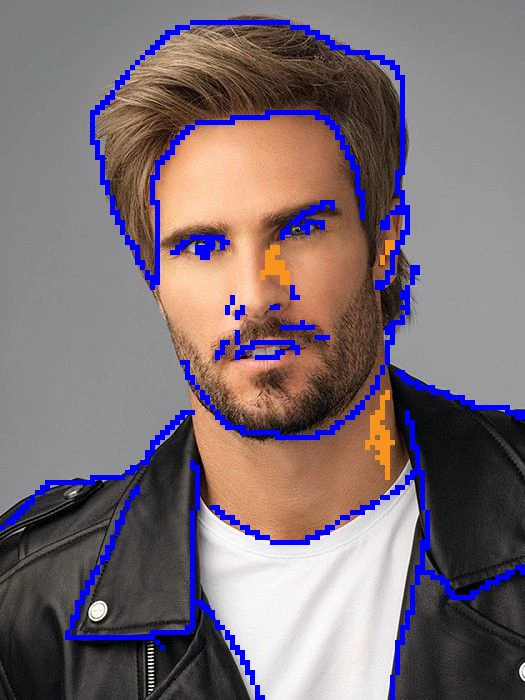
Here's a quick example:


2 replies

c.pfaffenbichler
Community Expert
Community Expert
May 4, 2019

Depending on what you want exactly Filter > Pixelate > Mosaic on a Smart Object could be another option.

Semaphoric
Community Expert
SemaphoricCommunity ExpertCorrect answer
Community Expert
May 4, 2019

You could do it like this:

Assuming your image is just a single background layer, duplicate that layer, and make it a Smart Object. In the Layers panel menu, choose Edit Contents. The SO will open in a new window. Scale it down with Image Size with Nearest Neighbor,, using a percentage that will easily scale back up to 100% later, like 20%. You'll probably want to zoom in. Your image will look all pixelated, but it doesn't matter.

Add  a new layer, and paint your pixel art. When you're done, hide the base layer, save it and close it. You will see your pixel art, but it will be tiny, so Edit > Transform > Scale back up to full size. If you'd used my example of 20% to scale down the SO before, scale it up 500%. Be sure that Resampling is set to Nearest Neighbor in the Preferences.

If you want to make any changes to your pixel art, just Edit Contents, Save, and Close again.

Here's a quick example: