Participant
February 15, 2019
Question

Photoshop is sucking all my RAM ?!
  • February 15, 2019
  • 1 reply
  • 525 views

Hi so, my photoshop is being insane. Im working in a simple 3 layer image. So why is it eating 10gb of memory, ?!  PLease somebody help. ❤️

    This topic has been closed for replies.

    1 reply

    JJMack
    Community Expert
    Community Expert
    February 15, 2019

    Photoshop uses RAM for many things.  How big is your document Canvas in Pixel,  Any of you layers  have high overhead  like a placed in PSD image where you have pixels for the object , pixels for the layers content and the psd file embedded in the layers object.  How may history states do you configure in your Photoshop Preferences.  History stated require copies of you document current state for each history state in the histort palette. How long has Photoshop been up? Have you run any actions and scripts that did a lot of processing.  When Photoshop Allocate RAM it it does not give it back to the system till you close down Photoshop of use Edit>Purge  It hard to know why Photoshop has allocated 10GB of RAM unless we know all you have used Photoshop for since starting it. Is all of the 10GB being used for your current document. Perhaps it is  than again perhaps it is not.

    JJMack
    wrtq5ytAuthor
    Participant
    February 16, 2019

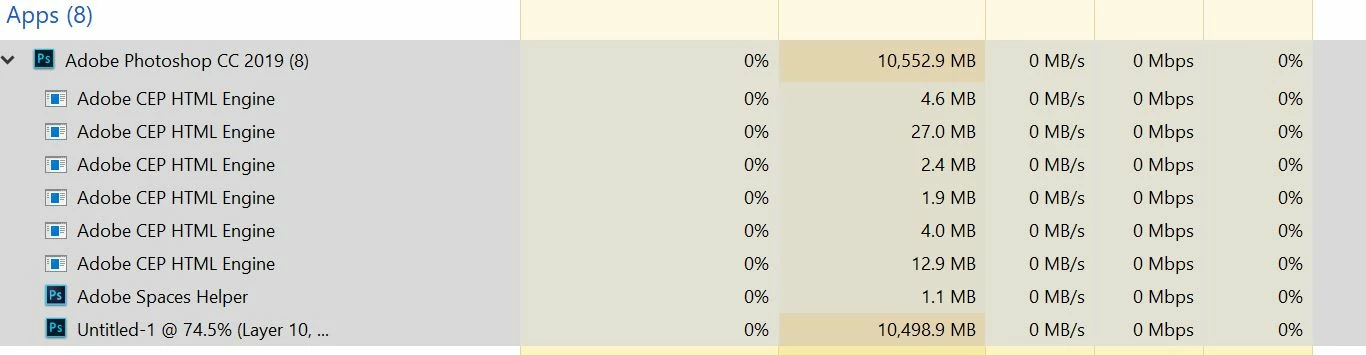
    Ok so for example, here is a photoshop file. It has actually only background layer, and 1 more layer in normal mode, in which i just doodled a little.  Canvas size is 4000x3000, resolution 96 pixels per inch. sounds high but it is absolutely not. For digital painters, this is even small. Usually my work goes up to 6-7k and this is standard in my industry. Now this one is maybe the one where, im overdoing it, history states is set to 435.  Sometimes im painting, and there are a lot of strokes i do, every stroke is one history state so, sometimes im clicking control+z like a madman. Though maybe i do not actually need 435.

    and the Task manager shows me this.

    davescm
    Community Expert
    Community Expert
    February 16, 2019

    Assuming that the 4000 x 3000 is pixels and not inches then you are right that image is not unusually large - most cameras have a higher pixel count.

    You are right in saying that the history count is unusually high and may be leading to the RAM usage. However my question would be - are you suffering any ill effects from the high RAM usage? If not, then does it matter? Photoshop will use RAM as necessary up to the limits made available in Preferences. Once used - it holds the RAM as this is faster than getting it from the OS again. It will also use scratch disk space as required but RAM is obviously the fastest.

    Dave