Answered
Photoshop Keyboard Shortcut question
How do I get my Photoshop shortcuts to override the system shortcuts?
Specifically, I want "F7" to toggle my layers pallete, NOT to "skip backwards" on Apple Music/Spotify.
Thanks

How do I get my Photoshop shortcuts to override the system shortcuts?
Specifically, I want "F7" to toggle my layers pallete, NOT to "skip backwards" on Apple Music/Spotify.
Thanks
Because you mentioned Mac, this is controlled by a setting in macOS System Preferences. Open System Preferences, open the Keyboard preferences pane, click the Keyboard tab, and enable the option “Use F1, F2, etc. keys as standard function keys.”
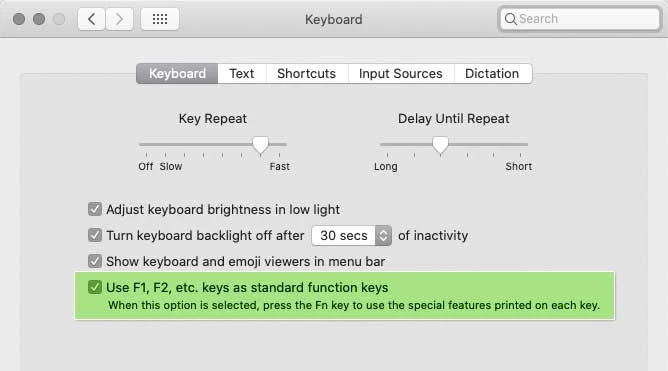
That will toggle the default behavior of your Fn keys in all applications.
By default, the Fn keys on a Mac work as “media keys,” controlling media playback, sound, brightness, etc. Enabling the option above makes the Fn keys work as function keys first.
You don’t lose any features, because whichever way the option is set, you can temporarily toggle it by also pressing the Fn key on your keyboard. Like right now, if you haven’t enabled that option yet, you can still toggle your Photoshop Layers panel by pressing Fn+F7. If you then enable the option, it swaps: Now you press F7 to toggle the Layers panel, and press Fn+F7 to control a music or video track.
Already have an account? Login
Enter your E-mail address. We'll send you an e-mail with instructions to reset your password.
 AdChoices