Participant
April 19, 2017
Answered

Photoshop keys match Mac to PC possible?

  • April 19, 2017
  • 3 replies
  • 3005 views

Hello!

I use photoshop at work on Mac and at home on PC very often with my Wacom tablet. It's slowed me down getting mixed up. Is there any way possible to change the shortcuts at work and at home to be as similar as possible? Mainly just resizing the brush throws me off since I like to use CTRL + OPTION for Mac vs the right click (on my pen) + alt for PC.

Any help would be amazing, thanks!
This topic has been closed for replies.
Correct answer Trevor.Dennis

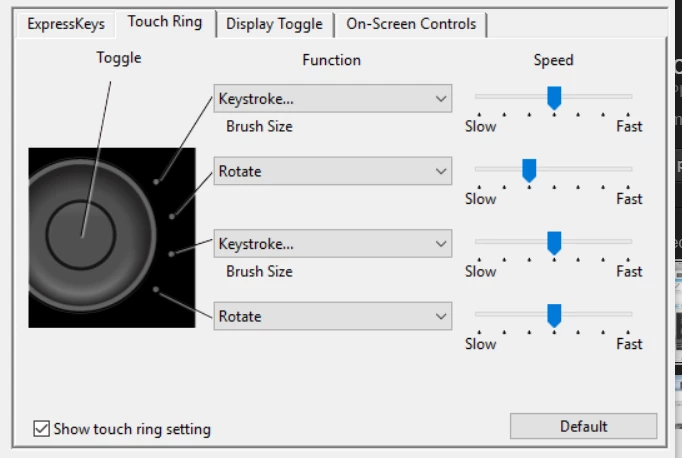
What Wacom tablet are you using?  If it is an Intuos, then the express wheel is my preferred method of changing brush size. I used to only use the Brush Size option because it was too slow toggling between the standard four options, but I now alternate the Express Wheel between Brush Size and Rotate Canvas, so I never need to hit the Toggle more than once to get the option I need.

3 replies

Trevor.Dennis
Community Expert
Trevor.DennisCommunity ExpertCorrect answer
Community Expert
April 20, 2017

What Wacom tablet are you using?  If it is an Intuos, then the express wheel is my preferred method of changing brush size. I used to only use the Brush Size option because it was too slow toggling between the standard four options, but I now alternate the Express Wheel between Brush Size and Rotate Canvas, so I never need to hit the Toggle more than once to get the option I need.

Participant
April 20, 2017

Thank you so much, Trevor.Dennis! This is the perfect way to make Mac and PC Photoshop the same so I can work without having to stumble often with shortcuts from different operating systems.

I edited my ExpressKeys at home and at work with their respective shortcuts for the Brush Size/Hardness hot keys; (Alt + R click) Window and (Control + Option) Mac, then for me I just hold the ExpressKey now so it doesn't matter which OS I'm on in Photoshop.

barbara_a7746676
Community Expert
Community Expert
April 20, 2017

Under the Edit menu, choose Keyboard Shortcuts. In the dialog box that appears, you can customize the shortcuts and save your own set of shortcuts.

Inspiring
April 20, 2017