
Clonkex
Known Participant
November 26, 2018
Answered

Photoshop Magic Wand take transparency into account?

  • November 26, 2018
  • 3 replies
  • 5740 views

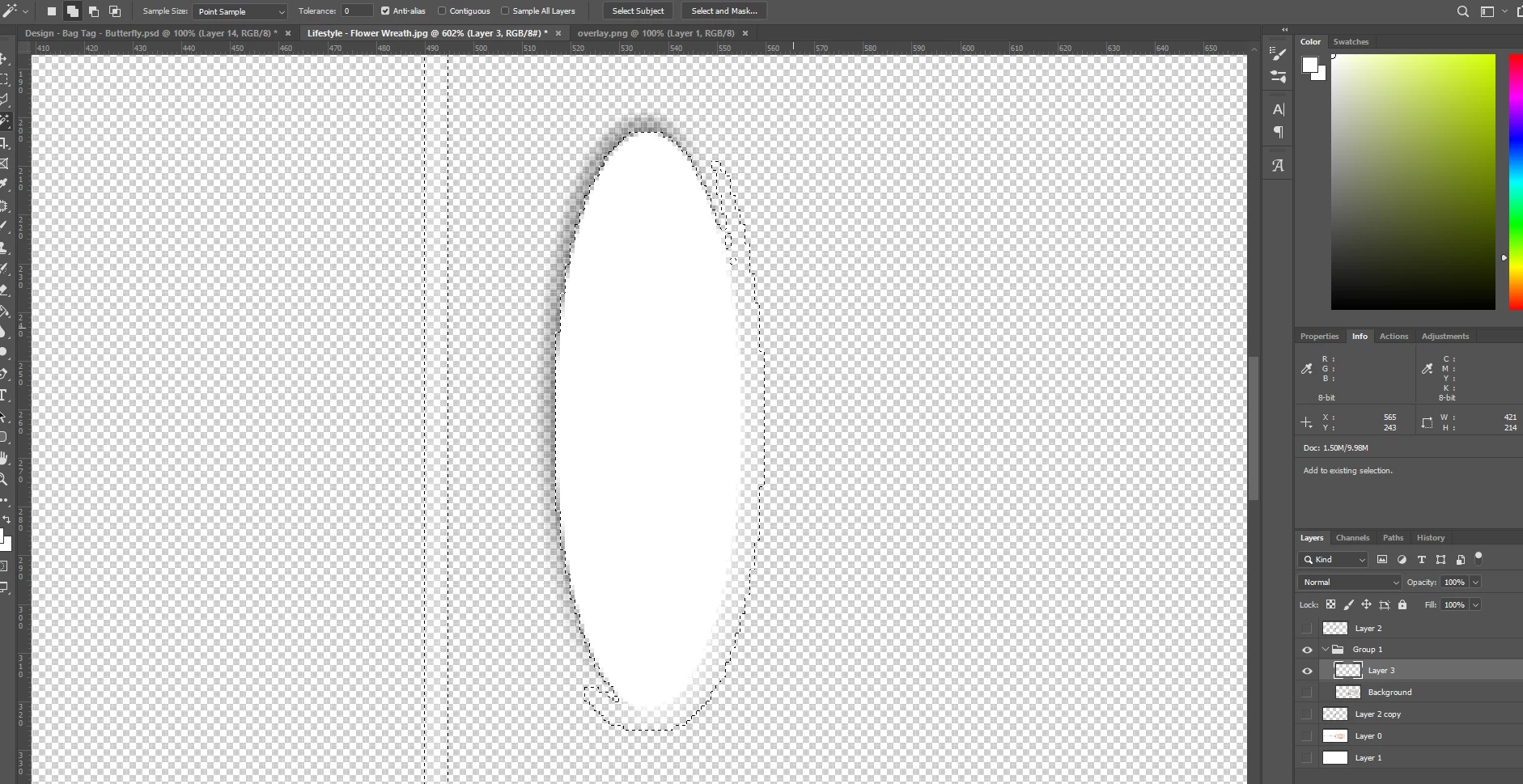
I've got an image with an opaque white oval and some partially transparent pixels around it. When I use the Magic Wand (even on 0 tolerance) it seems to also select some of the transparent pixels. I'm guessing that Photoshop is ignoring the alpha channel in the tolerance calculation. How can I make it stop ignoring the alpha channel and treat it the same as the other channels when using the Magic Wand tool?

As you can see in the screenshot, after clicking with the Magic Wand tool in the middle of the white oval it has selected a large number of pixels I don't want. I actually find it very frustrating when Photoshop assumes what I want without asking me, or giving me an option to change it.
This topic has been closed for replies.
Correct answer Chuck Uebele

Yes, it doesn't account tor transparency. You might want to try putting a bright color behind it, then use the magic wand tool, or make a selection using  channels.

Only the OP and Moderators can mark a question  correct.

3 replies

Semaphoric
Community Expert
Community Expert
November 26, 2018

As long as the opacity of a pixel is greater than zero,  it contains color information, which is what the Magic Wand selects. To only select pixels with 100% opacity, you could do this:

First, Select > Load Selection, Channel = Layer X Transparency. Next make you selection with the Magic Wand, set to Intersect with Selection in the Options:


Finally, enter Quick Mask mode, and with the Quick Mask channel active, Image > Adjustments > Threshold, with a value of 255, and exit Quick Mask.

Clonkex
ClonkexAuthor
Known Participant
November 26, 2018

The problem is that I actually wanted Magic Wand to take into account alpha the same way it does the red, green and blue channels, so I could use a threshold and have it select some of the pixels that were only slightly transparent. It's very unintuitive that setting Magic Wand to 0 threshold can select pixels that are not visually identical as the pixels I clicked on. I wasted a good half an hour trying to figure out what I did wrong to make it select pixels that weren't the same, even with 0 threshold. I honestly expected more from Adobe. This is the kind of thing where people just shrug and say "idk man, that's just the way it is" but there's no excuse for it. It's unintuitive, nonsensical behaviour and it would be so incredibly easy to provide an option for it.

Also wouldn't it be much faster and easier to just ctrl+click the layer thumbnail to make a selection based on transparency instead of going through the pretty awkward Load Selection workflow?

Semaphoric
Community Expert
Community Expert
November 26, 2018

It certainly would be easier! I was just using the via menu method while I was experimenting, since it has various options, such as intersect and invert, which turned out not to be needed.

I'll admit to being one of the "That's the way it's always been" crowd. The problem is when Adobe does change things, w can end up with situations like the new behavior of Transform

You may want to post about this  here: Photoshop Family Customer Community, as the developers read that more than they do here.

Chuck Uebele
Community Expert
Chuck UebeleCommunity ExpertCorrect answer
Community Expert
November 26, 2018

Yes, it doesn't account tor transparency. You might want to try putting a bright color behind it, then use the magic wand tool, or make a selection using  channels.

Only the OP and Moderators can mark a question  correct.

Clonkex
ClonkexAuthor
Known Participant
November 26, 2018

Wow, I can't believe I didn't think of that. That's a ridiculously simple solution. Create a new layer under the layer I'm selecting, fill with it black, turn on Sample All Layers and make selection. Works perfectly.

I actually figured that it was selecting the transparent pixels because the pixels were the same on the RGB channels, even if the alpha channel was different, so I went searching and found you can essentially split the alpha layer out (Layer Mask > From Transparency) so I did that and then shift-clicked the layer mask to disable it so I could edit the pixels without their transparency, then used the Channels tab to turn on the alpha channel and turn off the RGB channels so I could make my selection based on the transparency alone, then turned the RGB channels back on and the alpha channel off, inverted my selection and filled the layer's RGB pixels with black. Now I can make the selection quickly with the magic wand tool whenever I need it.

I don't see why mods are allowed to mark an answer as accepted. That sounds like a terrible idea because, as evidenced on this post where a mod incorrectly marked the first reply as correct, they can be wrong. Only the OP can know for sure if an answer solves their problem. And for the record I still think it's totally stupid that Photoshop assumes I don't care about transparency, without even giving me an option to change the behaviour... but at least there's an easy workaround.

Chuck Uebele
Community Expert
Community Expert
November 27, 2018

Often people who post questions don't mark their questions answered. Normally, a mod will wait several days to see if a post has been marked correct by the OP, if not, they will try and figure out the correct answer, if there is one. Adobe wants as many questions marked answered correct as possible - some sort metrics they want, and they want people looking for answers to be a le to find post that have a correct answer marked as such.

Jeff Arola
Community Expert
Community Expert
November 26, 2018

Uncheck Anti-alias in the tool options bar.

Clonkex
ClonkexAuthor
Known Participant
November 26, 2018

Ok, first of all, WTF, why can someone else mark an answer correct?? I thought only Microsoft was stupid enough to allow that.

Second, thanks for trying to help but that doesn't solve the problem. As you can see there's still a heap of transparent pixels selected that are completely different to the pixels I clicked on (i.e. they're transparent while the ones I clicked are opaque; with 0 tolerance, there should be no tolerance for difference, including alpha):