Eric90615861
Participant
April 26, 2020
Question

Photoshop memory usage

  • April 26, 2020
  • 2 replies
  • 254 views

Hi

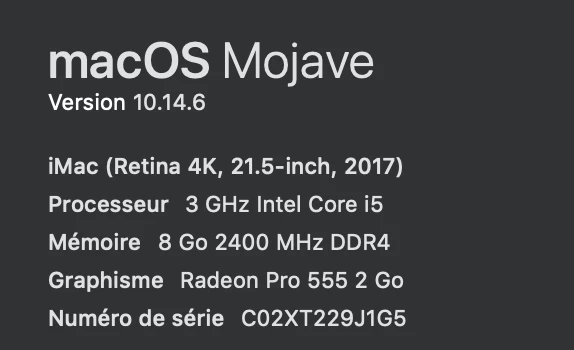
I'm on a mac
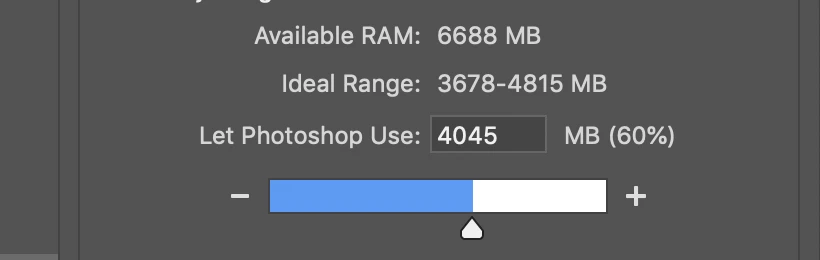
Whatever i choose in "memory usage" settings, photoshop takes all memory, after 10 or 20 minutes of work.

Of course, this is a problem : i can't even use my mac when photoshop is running.


What shall i do ? I have already install everything possible, OS include.


Thank's

Eric
This topic has been closed for replies.

2 replies

Legend
April 26, 2020

Might be that Photoshop can't run with less than 6 GB of VM today. It can try to keep down memory used for the image, but the app itself will need a huge amount of RAM, depending on which functions you use. The system requirements say "4 GB (8 GB recommended)". How large is your image in pixels & layers?

Eric90615861
Participant
April 26, 2020

I work in RAW, 6000x4000p.

I usualy use 10-12 layers.

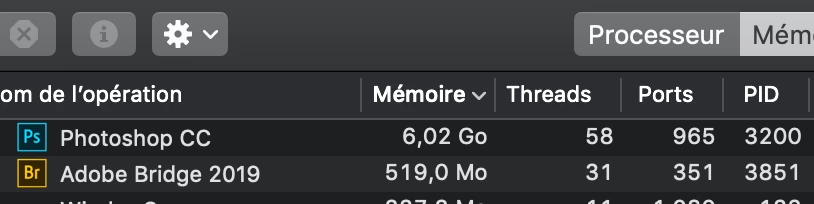
Yes, PS seems to "like" the 6go level of memory, and sticks to it, whatever the settings. I should try to add a little more memory, a guess.

Legend
April 26, 2020

That doesn’t show Photoshop using all the memory. 

Eric90615861
Participant
April 26, 2020

it shows photoshop using 90% instead of 60%, as set.

Legend
April 26, 2020

Yes, but because of virtual memory it will be using less (since if you add up the figures in Actitity Monitor it comes to way more than your RAM). Do you have performance problems in Photoshop?