Inspiring
December 4, 2018
Answered

photoshop menus grayed out

  • December 4, 2018
  • 4 replies
  • 4094 views

Desktop machine. 32 GB ram, 8GB video card.

most all my menus are grayed out. i have the current versions of PS and LR. windows 10 ver 1803 with updates.

control J does not make a new layer.

i have reset my preferences to default. no change. what should i do now?

all seems to be working on my laptop.
This topic has been closed for replies.
Correct answer

Hi

This is a known issues, either open Photoshop first before Lightroom or disable the home screen in preferences

4 replies

bijig71670523
Participant
January 5, 2019

Yes. Disabling the home screen has fixed the issue

D Fosse
Community Expert
Community Expert
December 4, 2018

Known issue with files coming from Lightroom. A fix is in the pipeline. In the meantime, have Photoshop open first, then open Lightroom. That works.

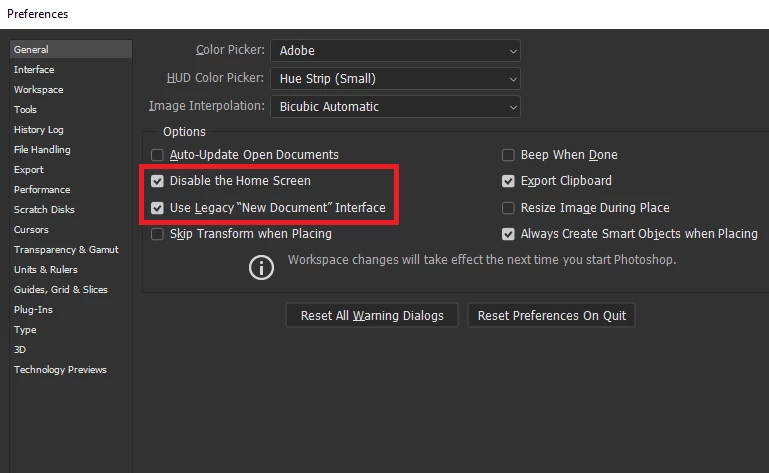
It has also been reported by some that disabling the Home Screen solves the issue - that's as yet unconfirmed. So could you first of all try to do that (if you have it enabled)? Disable the home screen here and relaunch Photoshop:

Correct answer
December 4, 2018

Hi

This is a known issues, either open Photoshop first before Lightroom or disable the home screen in preferences

D Fosse
Community Expert
Community Expert
December 4, 2018

Wow - does it take that long to prepare a screenshot? <you cheated, you had the screenshot ready>

Inspiring
December 4, 2018

it is working by opening PS first. thank you soo much. disabling the home screen did not work.

davescm
Community Expert
Community Expert
December 4, 2018

If you are getting greyed out menus when using "Edit in Photoshop" from Lightroom, with the latest update, do the following.  First open Photoshop, then open Lightroom. Now use Edit in Photoshop which should work correctly.

Dave