

Photoshop | My printer has started printing slightly oversize
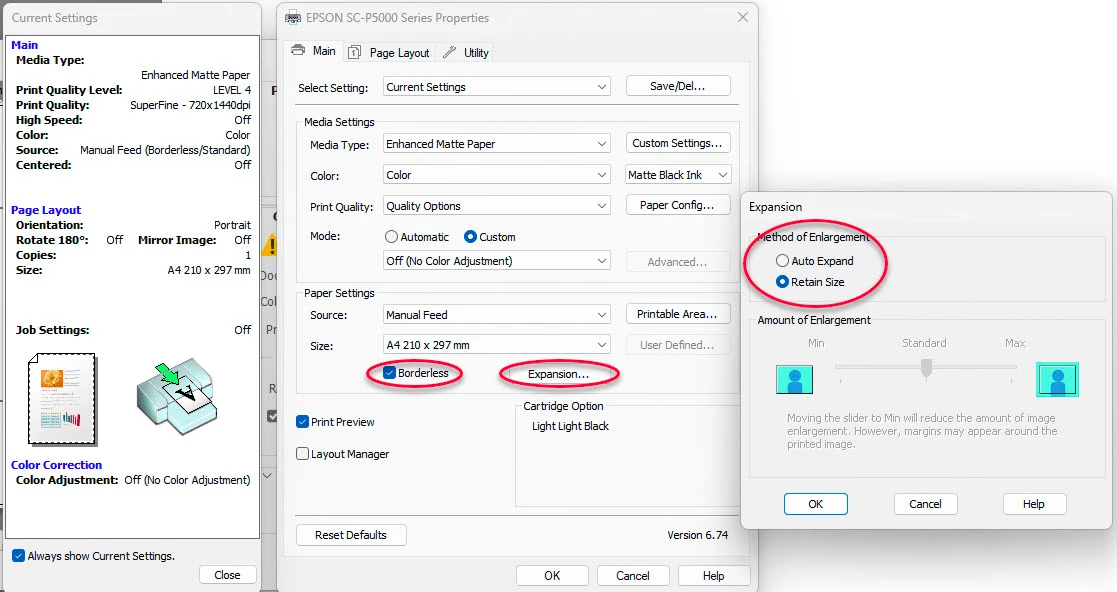
I've been working over a print on A2 sized paper (594mm x 220mm) and have made a number of trial prints over the last few days. I am printing on an Epson SureColor P800 set to marginless mode. The image size is set to 594 x 220 and I have been filling full width of the paper. However the margins on my last print yesterday were smaller than expected and I have found that the image (landscape) has increased in height by 10mm and in width by 12.5mm. I have done nothing which might hasv brought this about. By printing from CAD files at 1:1 scale I have verified that the printer's scaling is still extremely accurate. Windows 11 Pro is 23H2 was updated to OS Build 22631-3672 on 19 April 2024. Photoshop has been updated almost daily and I believe the last update was yesterday (7 June 2024). I have no details of the version. The printer driver and firmware has not been updated for months. I strongly suspect the problem has something to do with PhotoShop and I would be grateful for suggestions as to what might be happening. In the meantime I will have to rescale ay prints but that is not a long term solution.
 AdChoices