
Participant
October 1, 2023
Answered

Photoshop NEF conversion to JPEG

  • October 1, 2023
  • 3 replies
  • 708 views

Hi All

I shoot my photos in NEF so I can edit as needed. I usally save a copy as JPEG to share with my family. I have not had any problems until now.

Once I am finished with my edits I then save to JPEG, but I am seeing this now

when I go to save I see JPEG 2000 with the following 

JPF

JPX

JP2

J2C

J2K

JPC

Not just a JPEG option.

When I save it the file is un veiable and is a XMP or a JPF 

I would love some help please.

Thanks

Brent
This topic has been closed for replies.
Correct answer Trevor.Dennis

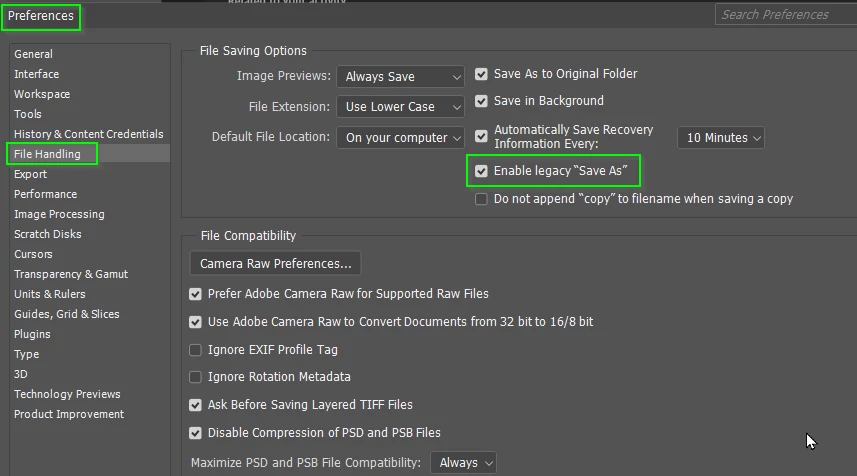
I am not so sure this fits, but give it a try.


3 replies

Stephen Marsh
Community Expert
Community Expert
October 1, 2023

As @Trevor.Dennis wrote, enabling legacy Save As is one solution.


Another solution is to ensure that the current file meets the JPEG specification (8 bpc, no alpha channels, flattened - no layers).


Yet another solution is to save directly to JPEG from within ACR, without rendering and opening the image/images into Photoshop, therefore avoiding the need to use Save/Save As/Save As a Copy:


Trevor.Dennis
Community Expert
Trevor.DennisCommunity ExpertCorrect answer
Community Expert
October 1, 2023

I am not so sure this fits, but give it a try.


CanadeAuthor
Participant
October 8, 2023

Thanks so much, It worked

kglad
Community Expert
Community Expert
October 1, 2023

<moved from cc desktop>