
May 5, 2018
Answered

Photoshop non funziona

  • May 5, 2018
  • 2 replies
  • 20763 views

Ciao , ho problemi con photoshop non riesco ad usarlo mi da solo messaggi di errore tipo (Impossibile completare il comando poiché la memoria RAM non è sufficiente)non riesco ad entrare nelle preferenze-prestazioni mi da sempre messaggio di errore (Questo valore deve essere un numero intero compreso tra 96 e 8. é stato inserito il valore più vicino) e qua si blocca non riesco a chiudere ne il messaggio ne photoshop e se cerco con risoluzione problemi mi dice che photoshop ha riscontrato problemi con il driver video. Ho anche disinstallato e reinstallato ma niente anche ripristinato il pc e reinstallato photoshop ma non riesco a risolvere.
This topic has been closed for replies.
Correct answer

Hi

Take a look at this thread page two, people have said that doing the below has worked for them

Photoshop 2018 Memory Issue

I tried this solution and it also worked for Photoshop CC v19. Thanks!

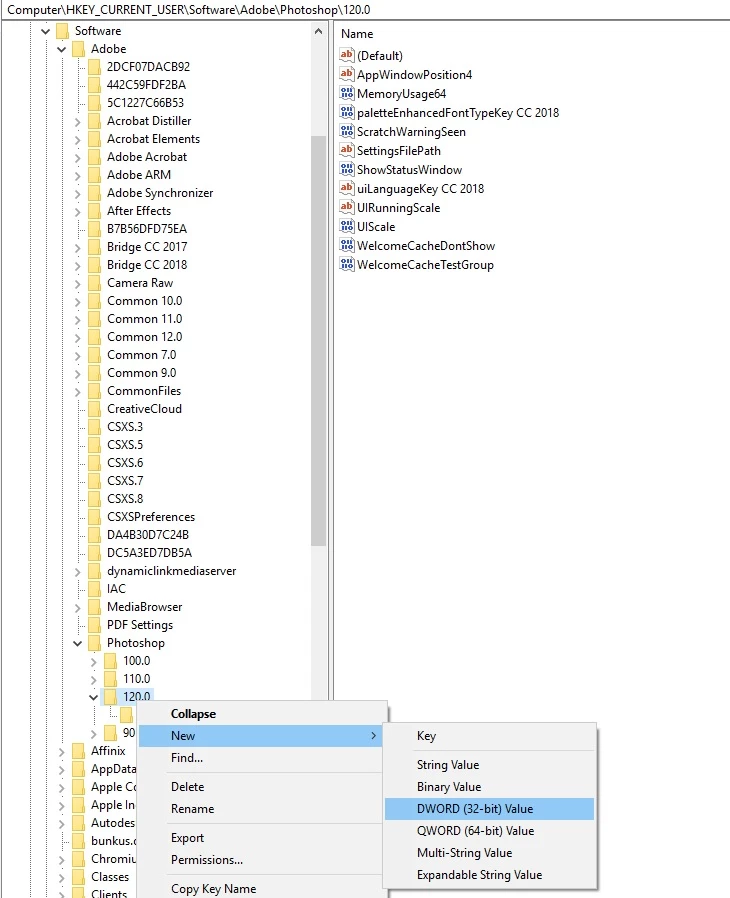
In Regedit:

\HKEY_CURRENT_USER\Software\Adobe\Photoshop\120.0

Added DWORD "OverridePhysicalMemoryMB" with the value "24000" decimal bas (=24 GB RAM = my installed RAM).

When you go into the registry right click on 120.0 and select New DWORD (32-bit) value

2 replies

Known Participant
May 6, 2018

Estou tendo o mesmo problema como mostra o anexo. "An integer between 96 and 8 is required"

Porem no meu sistema win10, não tem esse caminho: HKEY_CURRENT_USER\Software\Adobe\Photoshop\120.0 e nem este arquivo 120.0.

Como devo proceder?

Obrigado

Carlos

May 16, 2018

Ciao, start clicca destro in esegui scrivi regedit poi segui il percorso di sopra

Known Participant
May 16, 2018

Ciao Michele, Grazie mille, già risolto

Correct answer
May 5, 2018

Hi

Take a look at this thread page two, people have said that doing the below has worked for them

Photoshop 2018 Memory Issue

I tried this solution and it also worked for Photoshop CC v19. Thanks!

In Regedit:

\HKEY_CURRENT_USER\Software\Adobe\Photoshop\120.0

Added DWORD "OverridePhysicalMemoryMB" with the value "24000" decimal bas (=24 GB RAM = my installed RAM).

When you go into the registry right click on 120.0 and select New DWORD (32-bit) value

May 5, 2018

Ciao Ged , bravissimo hai risolto funziona correttamente ,grazie grazie grazie sei super

May 5, 2018

You're welcome, glad you got it sorted