
Participant
March 31, 2021
Question

Photoshop not recognizing my graphics car AMD Radeon 5700 XT.

  • March 31, 2021
  • 3 replies
  • 1143 views

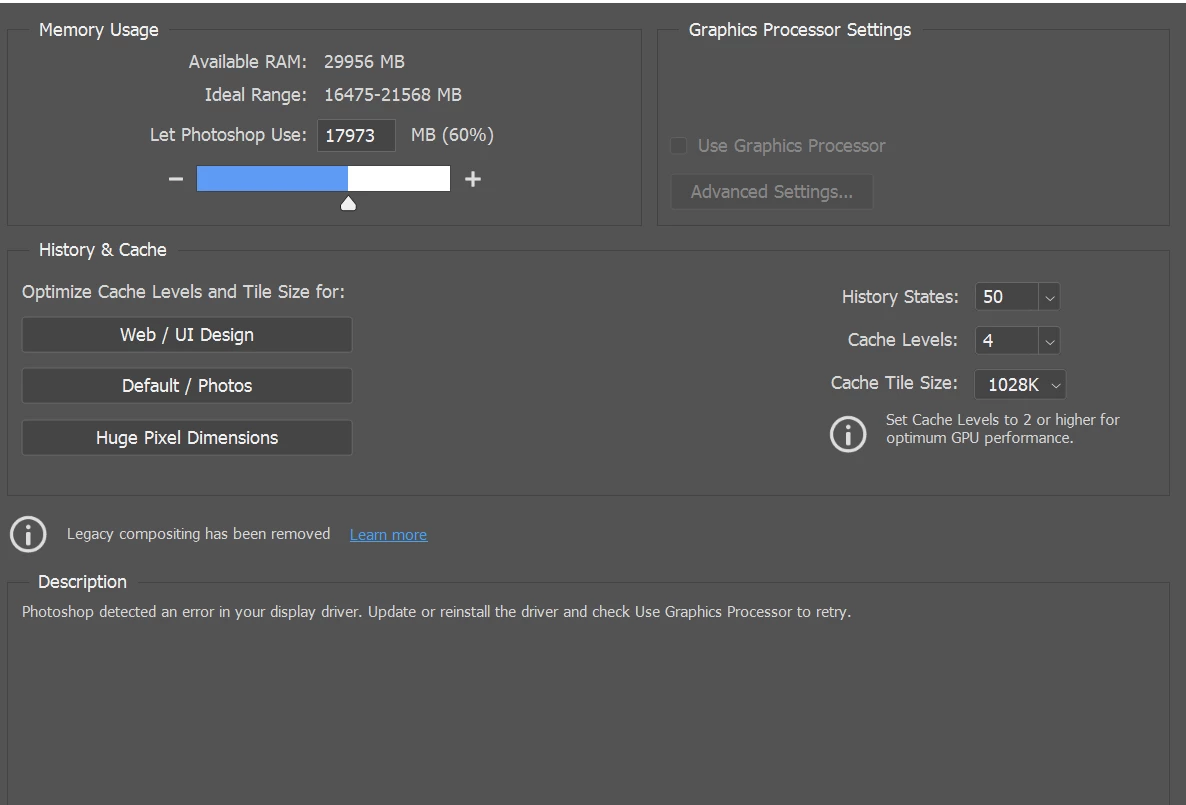
I have been trawling the internet to try find out a fix for this issue which is making using photoshop impossible. I have an AMD 5700 XT graphics card and photoshop says that there is an issue with the driver and the graphics card cant be used. 


I have reinstalled photoshop, all the drivers for the graphics card, updated my BIOS and it still doesnt work. Illustrator recognises the graphics card and works perfectly.


Is this an issue anyone else is experiencing? Any assistance in fixing this would be greatly appreciated because it is making photoshop prohibitatively slow to use.


This topic has been closed for replies.

3 replies

nadinef56330185
Known Participant
April 22, 2021

J'ai eu le même problème, voila la réponse qui m'a été donnée :

Try resetting preferences:

https://helpx.adobe.com/photoshop/using/preferences.html#reset_preferences


If that doesn't work, install the previous version (which users are having success with):

https://helpx.adobe.com/download-install/using/install-previous-version.html


Chez moi le reset des préférences a fonctionné

Participant
April 22, 2021

I have had the same issue with the AMD Radeon RX 5700 XT Graphics card and have also tried the same fixes without success. Photoshop runs, but runs slower and some features (for example Perspective Warp) are greyed out when they should not be. Is adobe addressing this issue?

D Fosse
Community Expert
Community Expert
April 1, 2021

If you have Photoshop version 22.3, revert to 22.2.


22.3 seems to have a number of GPU-related bugs. Failure (or partial failure) to recognize the GPU is one of them.

CRF5EAFAuthor
Participant
April 4, 2021

Thank you for taking the time to answer but unfortunately I tried that and it hasn't fixed the issue.