
Inspiring
June 6, 2018
Answered

Photoshop not saving files under 4G

  • June 6, 2018
  • 7 replies
  • 1330 views

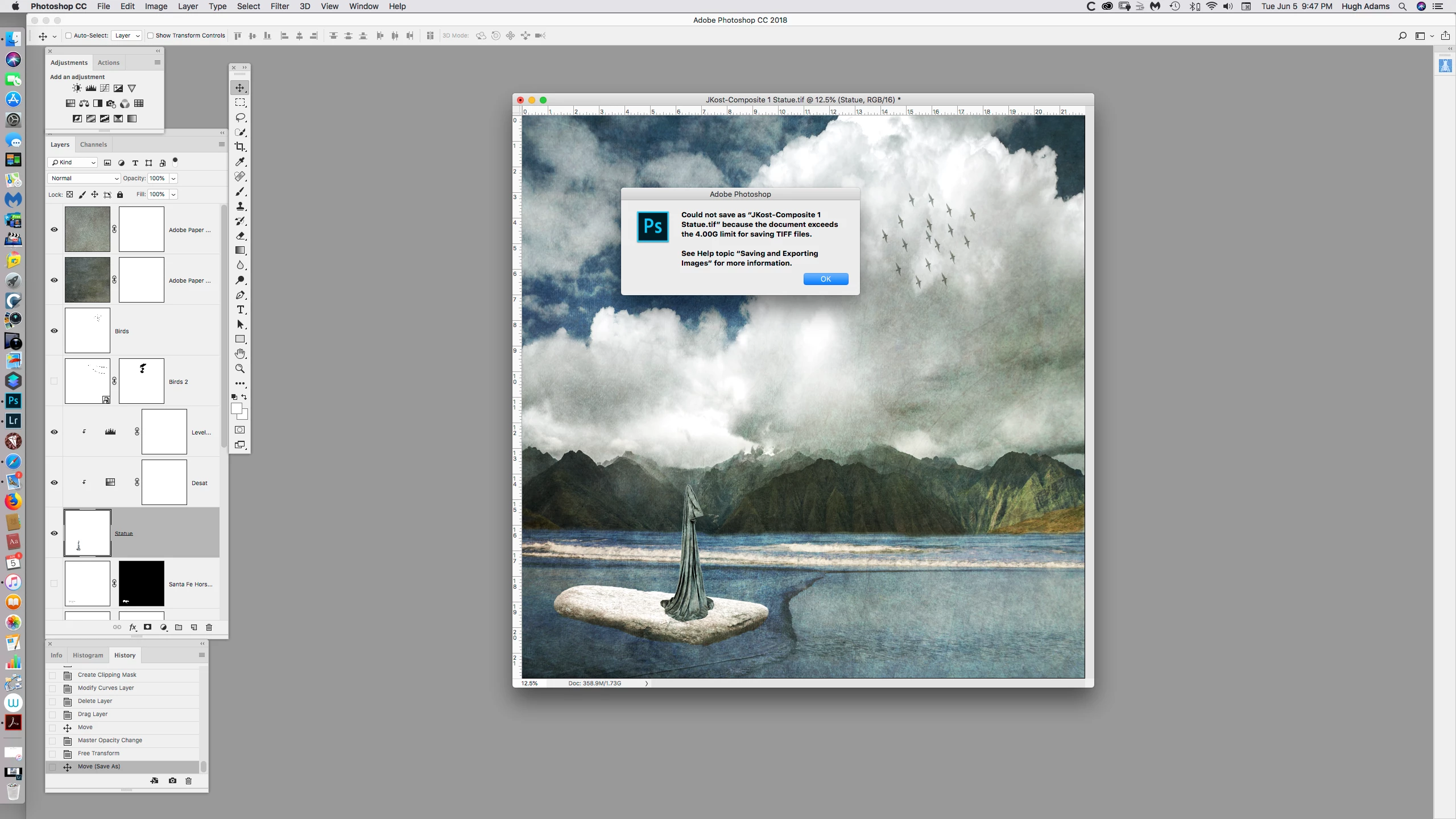
I have a file that is 1.7G. I get the message on the attached screen shot that says PS cannot save the document because its exceeds 4G which it does not.

This happens frequently. Why and how to save the document as a TIF.
    This topic has been closed for replies.
    Correct answer davescm

    Open the smart object(s)  and see the size of the opened psb file. You will need to add that to your 1.7G

    If you have nested SOs you have to repeat and drill down through them adding at each stage. The total file size  is all the SOs plus the main file - although file compression means that the space taken on disk may be smaller

    Dave

    7 replies

    Legend
    June 6, 2018

    You seem to be right, sorry for the bad advice.

    Legend
    June 6, 2018

    But this seems a lot of trouble. Why not use the PSB or PSD file with Lightroom?

    davescm
    Community Expert
    Community Expert
    June 6, 2018

    At present PSB files are not supported in Lightroom (it is an ongoing request)

    Lightroom: Support cataloging PSB files (files larger than 2 GB PSDs and 4 GB TIFFs) | Photoshop Family Customer Communi…

    Dave

    Legend
    June 6, 2018

    Yes, use the ZIP option.

    Legend
    June 6, 2018

    No size given is ever the size of a file. That's not what the numbers are for - and they can't be because the size won't be known unless or until you save, will be different for each file format, and different for each setting.

    I observe you are using uncompressed TIFF. This will be 2-3 times bigger than needed for no gain. Do you have a reason for this unusual setting?

    Inspiring
    June 6, 2018

    I just use the default setting. If I compress the file can it be saved in LR Classic CC and then reopened in PS?

    davescm
    Community Expert
    Community Expert
    June 6, 2018

    Afterimage  wrote

    I have a file that is 1.7G. I get the message on the attached screen shot that says PS cannot save the document because its exceeds 4G which it does not.

    This happens frequently. Why and how to save the document as a TIF.

    Your file contains at least one smart  (SOs) . There may be others as  I can't see your entire layers structure in the screenshot.

    The 1.7G reported at the bottom of the frame treats SOs as a pixel layer the size of the master document and does not include the size of any documents inside the SO. However those SOs are also saved in the overall TIFF. That can increase the size considerably as the SO can contain large multi layered files.

    Dave

    Inspiring
    June 6, 2018

    I have one smart object. good to know how PS treats SO's.

    If the image says its 1.75G, then how is PS calculating the file size in gigabytes so I will know what size file I have?

    davescm
    Community Expert
    davescmCommunity ExpertCorrect answer
    Community Expert
    June 6, 2018

    Open the smart object(s)  and see the size of the opened psb file. You will need to add that to your 1.7G

    If you have nested SOs you have to repeat and drill down through them adding at each stage. The total file size  is all the SOs plus the main file - although file compression means that the space taken on disk may be smaller

    Dave

    Legend
    June 6, 2018

    Then that probably explains your problem. When you save as TIFF you can choose a number of options like compression. It is vital to make a proper selection, the default will not be right for everyone. They also make a big difference to file size.

    Inspiring
    June 6, 2018

    This is the options I use

    Inspiring
    June 6, 2018

    I understand tif's can be 4GB. So why would a 1.7G not be saved?

    Legend
    June 6, 2018

    What TIFF options do you use? Please show your TIFF options.

    Inspiring
    June 6, 2018

    Not sure I understand what you are asking.