Barbara1979
Known Participant
February 25, 2017
Answered

Photoshop not working

  • February 25, 2017
  • 1 reply
  • 291 views

Hi,

I am using photoshop Cs6 version 13.0.6 x64 on a mac and i am getting a error message each time each time i want to use a tool. - Could not use rectangle tool because of a program error.

I have restarted my computer and it is still showing. Thanks
    This topic has been closed for replies.
    Correct answer Benjamin Root

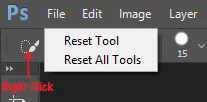
    Reset your tools:

    If that fails:

    Win: Press and hold Ctrl+Alt+Shift immediately after initiating Photoshop's startup. A box will appear asking if you want to continue with the reset, select "yes." If you don't see this, you weren't fast enough...Try again.

    Mac: Press and hold Cmd+Opt+Shift then start Photoshop. A box will appear, asking if you want to continue with the reset, select "yes."

    If you're still having issues, some files may be corrupted. Reinstall Photoshop.

    1 reply

    Benjamin Root
    Benjamin RootCorrect answer
    Legend
    February 25, 2017

    Reset your tools:

    If that fails:

    Win: Press and hold Ctrl+Alt+Shift immediately after initiating Photoshop's startup. A box will appear asking if you want to continue with the reset, select "yes." If you don't see this, you weren't fast enough...Try again.

    Mac: Press and hold Cmd+Opt+Shift then start Photoshop. A box will appear, asking if you want to continue with the reset, select "yes."

    If you're still having issues, some files may be corrupted. Reinstall Photoshop.

    Barbara1979
    Known Participant
    February 26, 2017

    Thank you. It's working again.

    Sent from my iPhone